Instant download · works offline · no account, no subscription All templates

For self-managing UK landlords & small agents

7 reasons to do your next inventory on a tablet

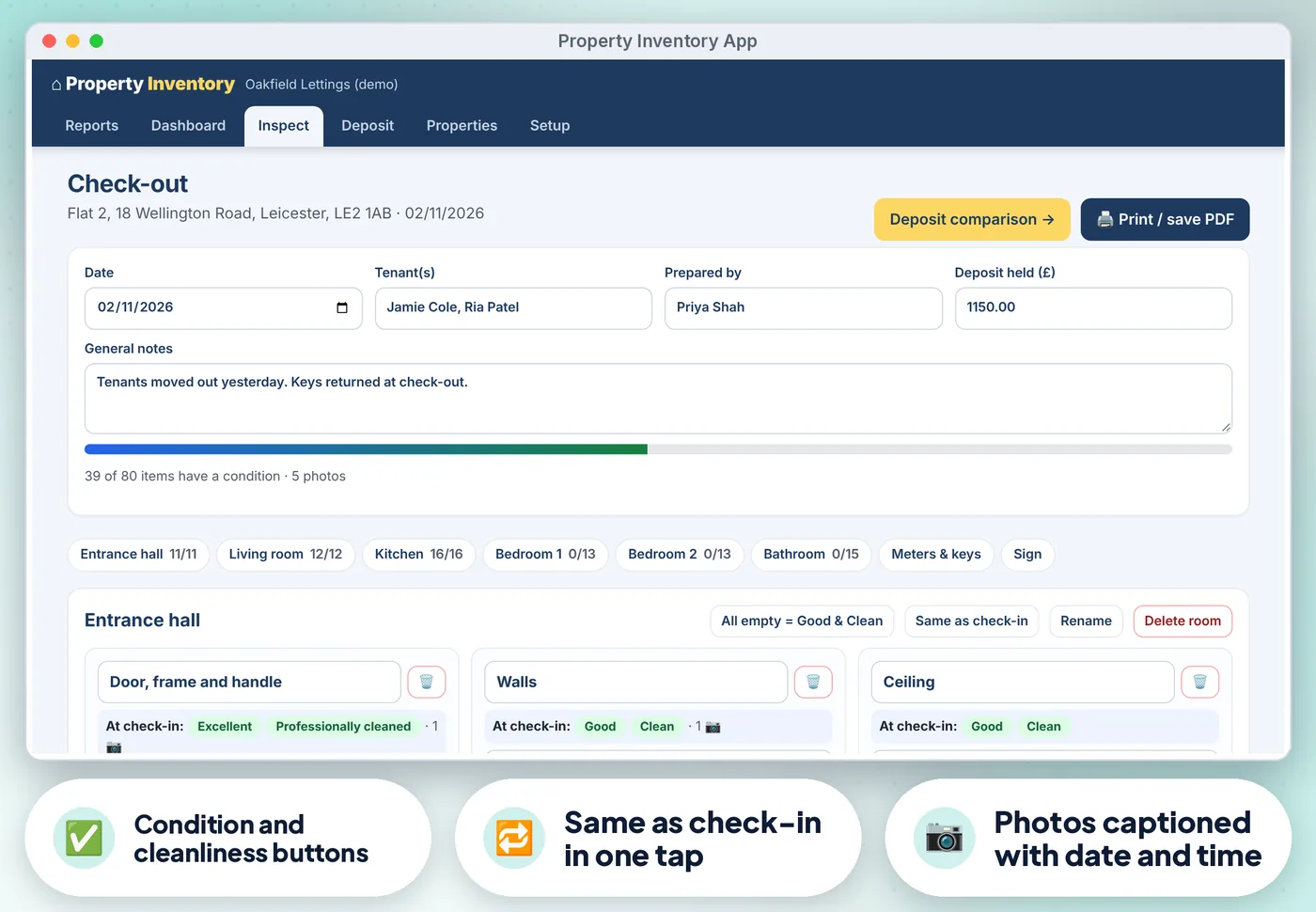
Walk round the property, tap the condition and cleanliness of each item, add dated photos, and get the tenant to sign on the screen. At check-out, anything worse than at check-in is highlighted and your proposed deposit deductions add up with reasons and evidence.

  • Works offline, one HTML file
  • Desktop browser & Android
  • Demo data to try first
  • No account, no subscription
Property Inventory App: annotated screen from the demo data

Screens from the app's built-in demo data. All names and figures are fictional.

3report types: check-in, mid-term, check-out
1HTML file, works offline
0accounts, installs or subscriptions

The list

Why a ready-made app beats paper and a blank spreadsheet

01

Properties with address, postcode check, type, bedrooms and furnishing

Rooms and items are filled in from those and you can add, rename or delete anything
Property Inventory App: annotated screen 1 from the demo data
02

Inventory and check-in, mid-term inspection and check-out reports for each…

…property

Property Inventory App: annotated screen 2 from the demo data
Get the app · £16.99 Instant download · works offline
03

Condition (Excellent, Good

Fair, Poor, Damaged, Missing) and cleanliness buttons, a description and notes for every item, and All empty = Good & Clean for a fast start
Property Inventory App: annotated screen 3 from the demo data
04

Photos for every item and meter, shrunk to save space and captioned

With the date and time from the file; on Android, Add photos can use the camera

05

Meter readings with serial numbers and photos

Keys handed over, smoke and CO alarm tests

06

On-screen signatures for the tenant and the landlord or agent

With an editable declaration

07

Print or save as PDF

The full report with photos, captions and signatures, ready to email to the tenant

Get the app · £16.99 Instant download · stuck? Email us for help

Compare

Three ways to keep these records

FeaturePaper formsA spreadsheetThis app
Condition (Excellent, Good✗No~ If you build it✓ Built in
Meter readings with serial numbers and photos✗No~ If you build it✓ Built in
On-screen signatures for the tenant and the landlord or agent✗No~ If you build it✓ Built in
Print or save as PDF✗No~ If you build it✓ Built in
CostFree, plus your timeFree, plus your time£16.99 once

What's inside

Everything you download

2 files

  • HTML Property-Inventory.htmlthe app. One file, opens in your web browser, works offline
  • PDF Start-here.pdfquick-start guide with the 3-step plan and backup tips
  • + Demo data built in, so you can try everything first

Also included

  • Check-out and mid-term show the check-in condition next to each item (Same as check-in in one tap) and highlight…
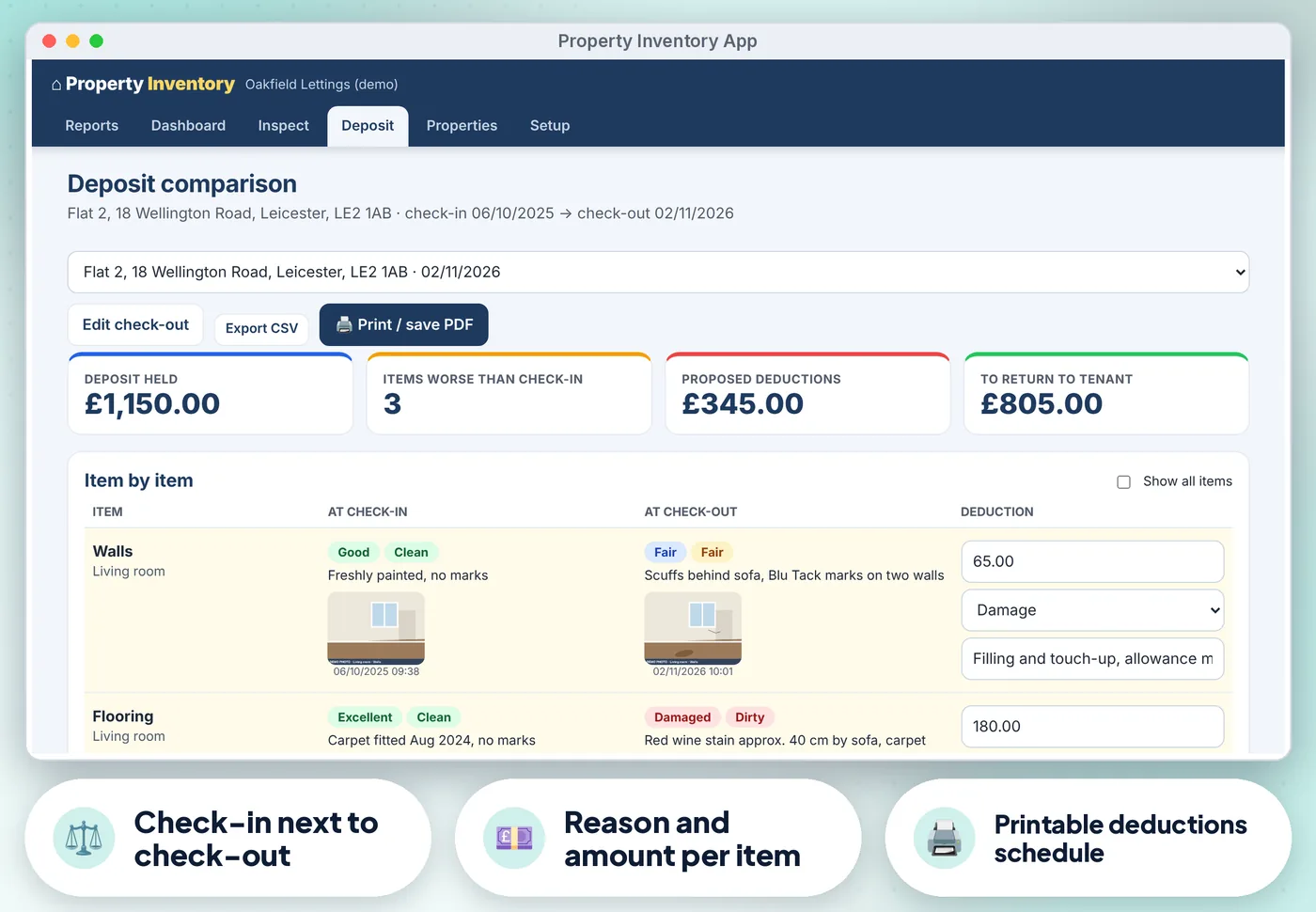
  • Deposit tab: worse items side by side with check-in and check-out photos, proposed deductions with reason and note…
  • Checks for future dates, a check-out with no check-in, bad postcodes and amounts, duplicate rooms and properties
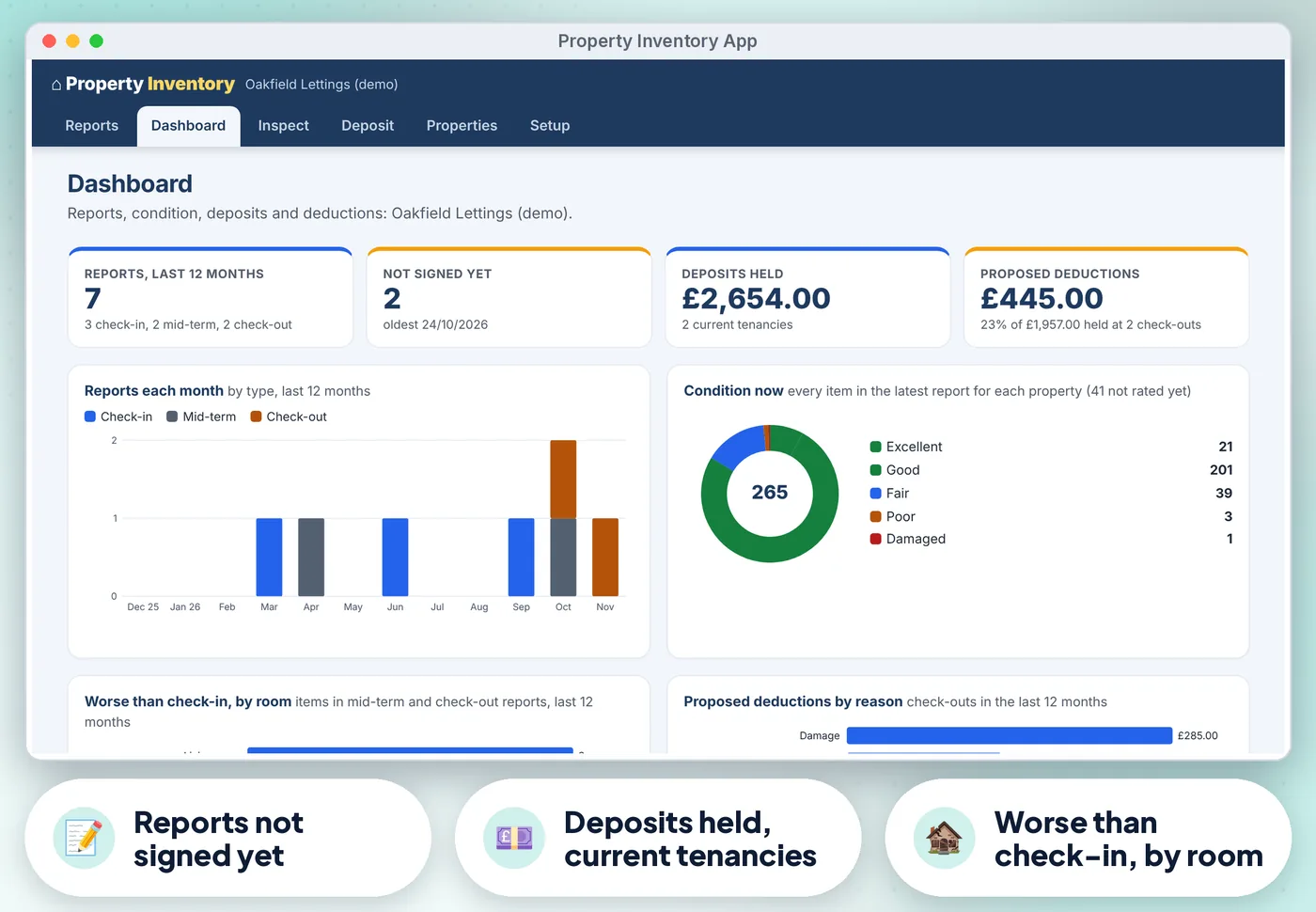
  • Dashboard with reports in the last 12 months, reports not signed yet, deposits held for current tenancies and proposed…
  • Full keyboard use, screen-reader labels, a skip link and high-contrast colours (tested against WCAG 2.2 AA with axe)
  • CSV export of reports and deductions, print, full backup with photos and restore

Good to know

  • Clean and Professionally cleaned count as the same standard in the comparison, so only real changes are flagged
  • Dates show as DD/MM/YYYY and amounts in pounds. Licence: one business, on as many devices in your business as you like
Property Inventory App: another screen from the demo data
Property Inventory App Screens from the app's built-in demo data. All names and figures are fictional.

Is it right for you?

Made for some, honestly not for others

A good fit if you…

  • self-managing UK landlords, small letting agents, HMO and student landlords and inventory clerks starting out
  • want something that works offline, on a desktop browser or Android
  • want to pay once, not another subscription

Not for you if you…

  • you need reports synced between several devices or staff
  • a cloud archive
  • AI-written descriptions
  • an app on iPhone or iPad

How it works

Three steps, about 5 minutes to set up

  1. 1

    Open the app, try the demo

    Press Use my data. In Setup enter your agency or landlord name and who prepares the reports, then add your properties (about 5 minutes).

  2. 2

    At the start of a tenancy

    Press New check-in, walk round tapping condition and cleanliness, add photos, meters, keys and alarms, and get the tenant to sign. Print or save the PDF and email it.

  3. 3

    At the end, press Check-out

    Tap Same as check-in where nothing changed, mark what is worse, then open Deposit to propose deductions and print the schedule.

Desktop browserTested in Google Chrome on a desktop (1440 px wide) and on Android phone sizes (390 px and 360 px wide). Also runs in current Edge and Firefox, and Safari on Mac
Android phone or tabletWorks offline once the file is saved on the device
0
No account, no subscriptionno installation, no account, no subscription, nothing is sent over the internet. Not iPhone or iPad yet: Safari on iOS cannot keep the app data from a downloaded file reliably, so we do not support it
Property Inventory App preview
  • Instant download
  • Demo data built in
  • Start-here guide

The offer

Property Inventory

£16.99one-off · no subscription

  • The app. One file, opens in your web browser, works offline (Property-Inventory.html)
  • Quick-start guide with the 3-step plan and backup tips (Start-here.pdf)
  • Licensed for use within one business or household
Buy now · £16.99

Price includes VAT where applicable — calculated at checkout. Secure checkout by Payhip.

Questions? Email info@phkmedia.co.uk Stuck after you buy? We'll help you set it up.

Digital download, nothing is posted. Property Inventory is a record-keeping aid. Terms & licence.

FAQ

Questions people ask

Is a report I make myself valid?

Yes, there is no rule that you must use a clerk. A detailed, dated, photographed report signed by the tenant is good evidence if there is a deposit dispute. The app does not give legal advice.

Can I charge for fair wear and tear?

No. The Deposit tab reminds you of that. If you and the tenant cannot agree, the deposit scheme's free dispute service decides.

Can I use it on my phone at the property?

Yes, on an Android phone or tablet, and Add photos can use the camera. Back up and restore to move reports to a computer.

What happens after I pay?

This is a digital product. Nothing physical will be shipped. Your download link appears straight after checkout and is also emailed to you.

Can I get help if I'm stuck?

Yes. Message us at info@phkmedia.co.uk and we'll help you set it up.

Stop doing it the hard way. Get the Property Inventory App.

Get the app · £16.99