Instant download · Excel & Google Sheets · no macros All templates

For registered UK childminders

7 reasons to stop doing childminding sums every Friday

Childminding is busy enough without a calculator every Friday. This spreadsheet works out every session's fee, keeps funded hours off the parents' bill, tracks what each family and your council still owe, and tells you roughly how much to set aside for Income Tax and National Insurance, using the HMRC childminder method for use of home.

  • Excel & Google Sheets, no macros
  • Example + blank file
  • Start-here guide
  • One-off price, no subscription
Childminder Business Tracker: annotated screen from the example file

Screens from the included example file. All names and figures are fictional.

40children
3,000sessions
55pa mile, 2026/27 mileage rate
0macros, add-ons or subscriptions

The list

Why a ready-made template beats paper and a blank spreadsheet

01

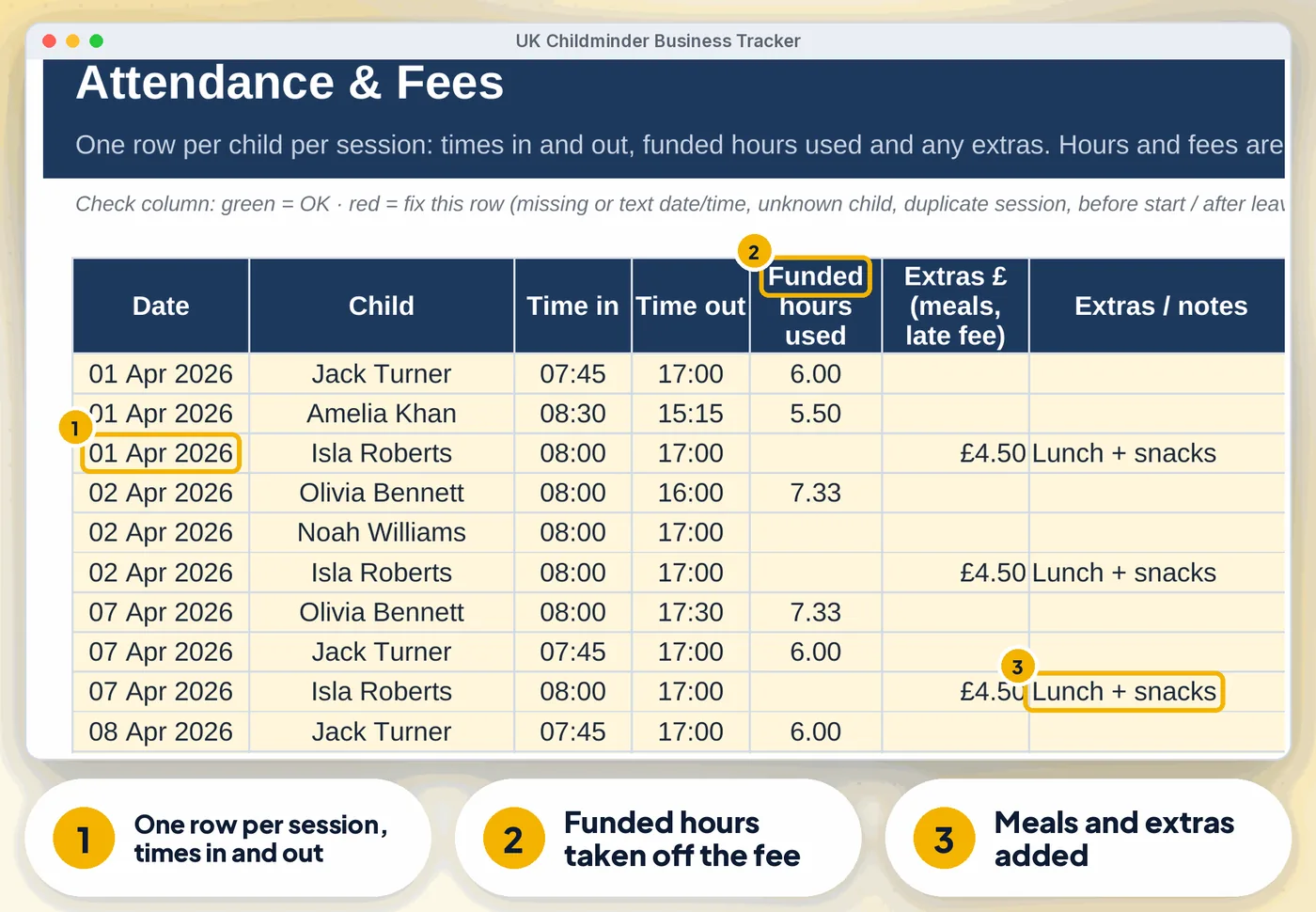
Fees worked out from every session

Time in and out, funded hours used, extras (meals, late fees), each child's own hourly rate or your default rate
Childminder Business Tracker: annotated screen 1 from the example
02

Funded hours

15h universal (3-4), 30h working parents, 15h 2-year-olds, or a Wales, Scotland or NI scheme. Funded hours are never charged to parents, and LA funding still to come is worked out per child
Childminder Business Tracker: annotated screen 2 from the example
Get the template · £18.99 Instant download · Excel & Google Sheets
03

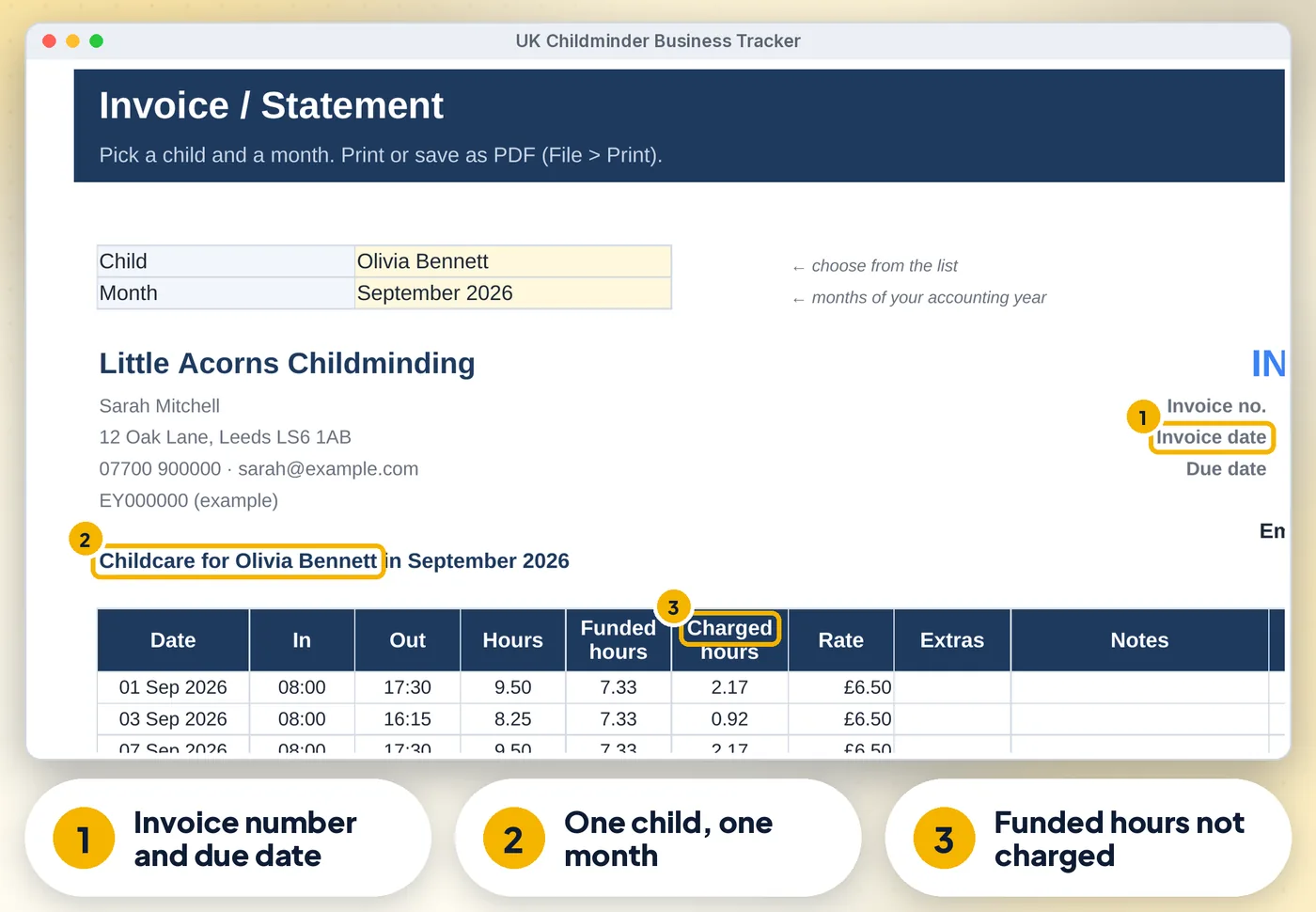
Invoice / Statement

Pick a child and a month for every session, funded hours, balance brought forward, payments received and amount due. Print or save as PDF
Childminder Business Tracker: annotated screen 3 from the example
04

Payments from parents, Tax-Free Childcare, childcare vouchers and your council

With balances owed per family

05

Expenses with the HMRC childminder method

Food, toys and other costs, household running costs by hours used, 10% of fixed costs (Council Tax, rent, mortgage interest) for 40+ hours a week, and 10% wear and tear. Or actual costs with a business % (for Making Tax Digital)

06

Business mileage at the 2026/27 rates

(55p a mile for the first 10,000 miles, 25p after)

07

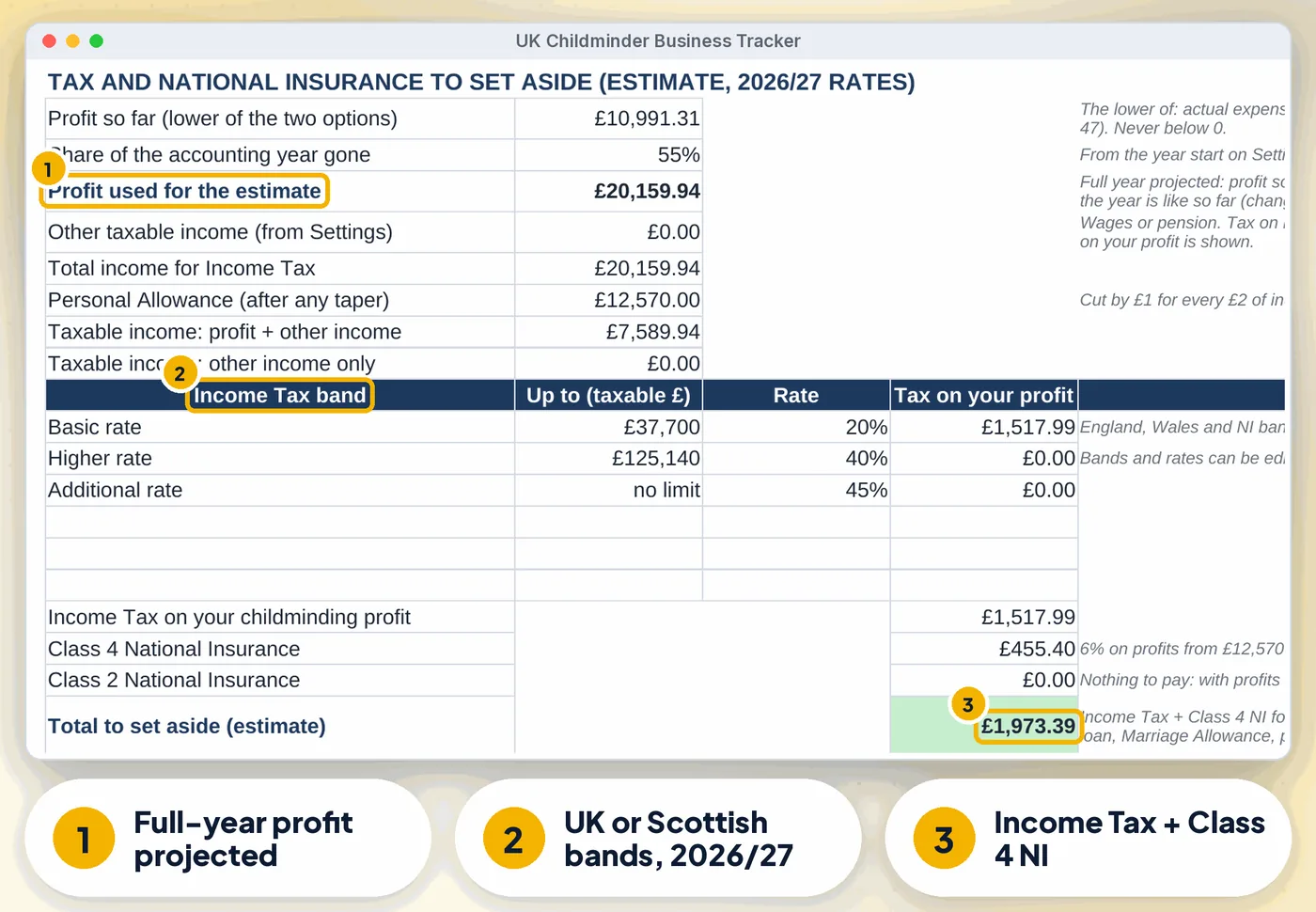
Tax Summary

Income by type, allowable expenses, profit, the £1,000 trading allowance check, and an Income Tax + Class 4 NI estimate at 2026/27 rates (England, Wales, NI or Scottish bands), with a % of each payment to set aside and payments on account

Get the template · £18.99 Instant download · stuck? Email us for help

Compare

Three ways to keep these records

FeaturePaper or notesA blank spreadsheetThis template
Fees worked out from every session✗No~ If you build it✓ Built in
Funded hours✗No~ If you build it✓ Built in
Invoice / Statement✗No~ If you build it✓ Built in
Expenses with the HMRC childminder method✗No~ If you build it✓ Built in
Business mileage at the 2026/27 rates✗No~ If you build it✓ Built in
CostFree, plus your timeFree, plus your time£18.99 once

What's inside

Everything you download

3 files

  • XLSX UK-Childminder-Business-Tracker.xlsxfilled with fictional example data (7 children, 350 sessions) so you can see how it works
  • XLSX UK-Childminder-Business-Tracker-BLANK.xlsxan empty copy, ready for your own setting
  • PDF Start-here.pdfone-page quick-start guide, including how to open it in Google Sheets

Also included

  • Self Assessment dates for your year (register, paper and online deadlines, 2nd payment on account) and the Making Tax…
  • Dashboard: income, expenses, profit, owed by parents, LA funding to come, hours and funded hours by month, a "What…
  • Checks on every row: text in a date, time or amount, unknown child or category, duplicate sessions, sessions before a…
  • Up to 40 children, 3,000 sessions, 800 payments, 800 expenses and 500 journeys

Good to know

  • A Health check on the Start Here tab and a Check/Status column on every log flag missing or odd entries
  • Keep receipts for costs of £10 or more (HMRC childminder guidance). Keep records for at least 5 years after the 31 January deadline
  • Dates show as DD/MM/YYYY
Childminder Business Tracker: another screen from the example
Childminder Business Tracker Screens from the included example file. All names and figures are fictional.

Is it right for you?

Made for some, honestly not for others

A good fit if you…

  • registered childminders in the UK who do their own Self Assessment
  • use Excel or Google Sheets on a computer
  • want to pay once, not another subscription

Not for you if you…

  • need Apple Numbers or mobile-only editing
  • want someone to do the records for you

How it works

Three steps, about 5 minutes to set up

  1. 1

    Set up once

    Your details, accounting year, default rate and expense method on Settings, then one row per child (about 5 minutes)

  2. 2

    Log as you go

    Sessions on Attendance, money received on Payments, costs on Expenses and Mileage

  3. 3

    Invoice and check

    Print a statement for each family, follow the Dashboard list, and use the Tax Summary for Self Assessment

Microsoft Excel2010 or newer (Windows & Mac) and Microsoft 365
Google SheetsFree Google account. Upload the .xlsx, then set the locale to United Kingdom
0
No macrosNothing to enable, no add-ons or subscriptions. Not designed for Apple Numbers or mobile-only editing. A computer is recommended
Childminder Business Tracker preview
  • Instant download
  • Example + blank file
  • Start-here guide

The offer

Complete Childminder Spreadsheet UK

£18.99one-off · no subscription

  • Filled with fictional example data (7 children, 350 sessions) (UK-Childminder-Business-Tracker.xlsx)
  • An empty copy, ready for your own setting (UK-Childminder-Business-Tracker-BLANK.xlsx)
  • One-page quick-start guide, including how to open it in Google Sheets (Start-here.pdf)
  • Licensed for use within one business or household
Buy now · £18.99

Price includes VAT where applicable — calculated at checkout. Secure checkout by Payhip.

Questions? Email info@phkmedia.co.uk Stuck after you buy? We'll help you set it up.

Digital download, nothing is posted. This spreadsheet is a record-keeping aid, not tax advice and not Making Tax Digital software. Terms & licence.

FAQ

Questions people ask

Does it file my tax return?

No. It gives you the figures for your Self Assessment and an estimate to set aside.

Does it work on a phone?

You can view it in the Google Sheets app, but entering data is easiest on a computer.

What happens after I pay?

This is a digital product. Nothing physical will be shipped. Your download link appears straight after checkout and is also emailed to you.

Can I get help if I'm stuck?

Yes. Message us at info@phkmedia.co.uk and we'll help you set it up.

Stop doing it the hard way. Get the Childminder Business Tracker.

Get the template · £18.99