Next MTD quarterly update due 7 Nov 2026 What's MTD?

For UK landlords · Updated for the 2026/27 tax year

7 reasons UK landlords should stop doing their rental accounts by hand

One spreadsheet that shows your profit, flags late rent and adds up your Making Tax Digital quarters for you. For 1 to 20 properties, in Excel or Google Sheets.

  • Laid out on HMRC's SA105 boxes
  • MTD 2026/27 dates built in
  • Excel & Google Sheets, no macros
  • One-off price, no subscription
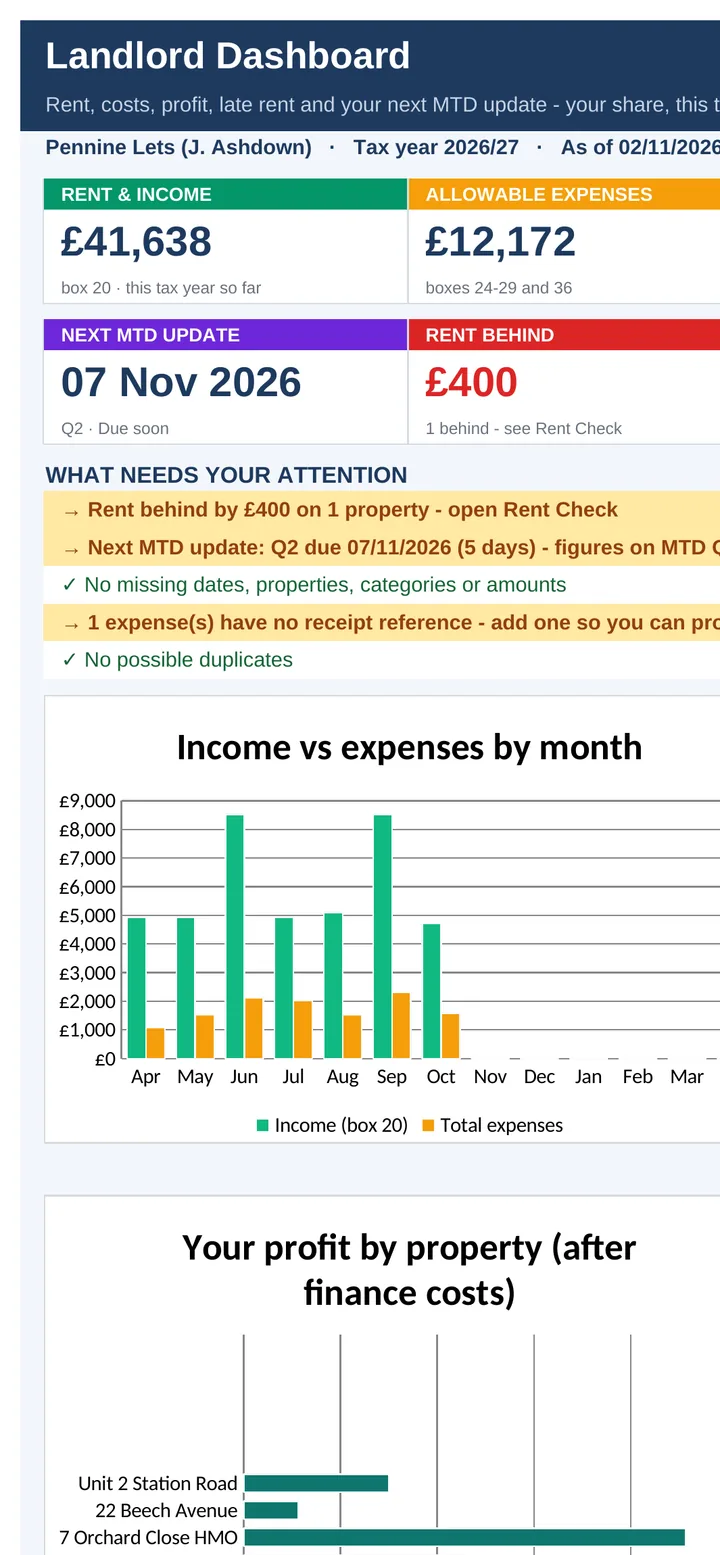
Landlord Dashboard on a phone: rent and income £41,638, allowable expenses £12,172, next MTD update 7 Nov 2026, rent behind £400 (example data)

Screens from the included example file. All names and figures are fictional.

1–20properties, joint owners welcome
13tabs, from Dashboard to Tax Summary
8SA105 boxes filled as you type
4MTD quarters with due dates & days left
0macros, add-ons or subscriptions

The list

Why a purpose-built tracker beats a shoebox and a blank spreadsheet

01

See your rental profit on one screen

Rent in, costs out, profit and an estimate of the tax to set aside, for your share, this tax year. The Dashboard updates every time you add a row, so you never have to add up a column again.

A "What needs your attention" list tells you what to do next: rent to chase, a missing receipt, the next deadline.

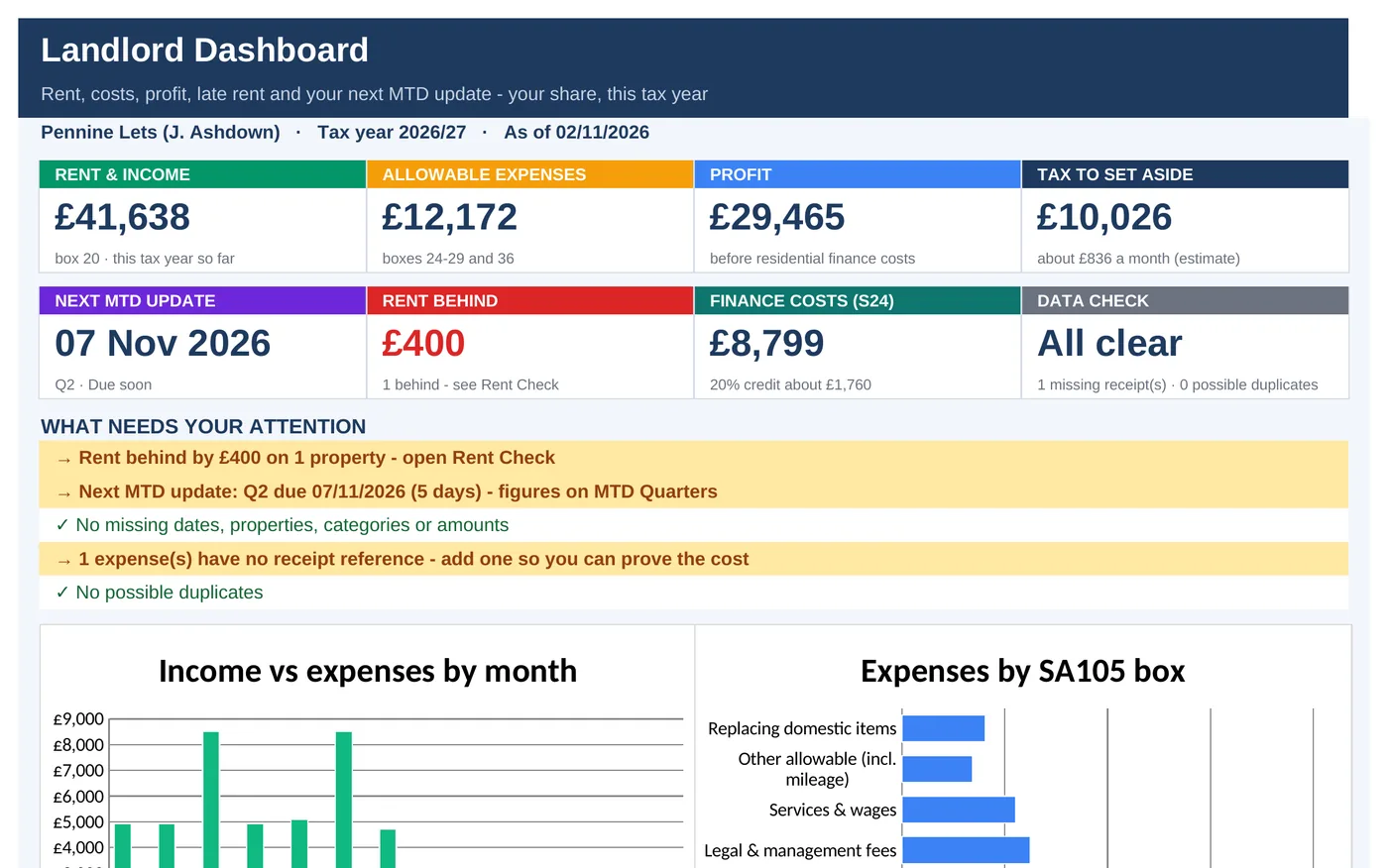
Landlord Dashboard tab with eight tiles: rent and income £41,638, allowable expenses £12,172, profit £29,465, tax to set aside £10,026, next MTD update 7 Nov 2026, rent behind £400, finance costs £8,799, data check all clear, and a list of things that need attention
02

Know who's behind on rent before it hurts

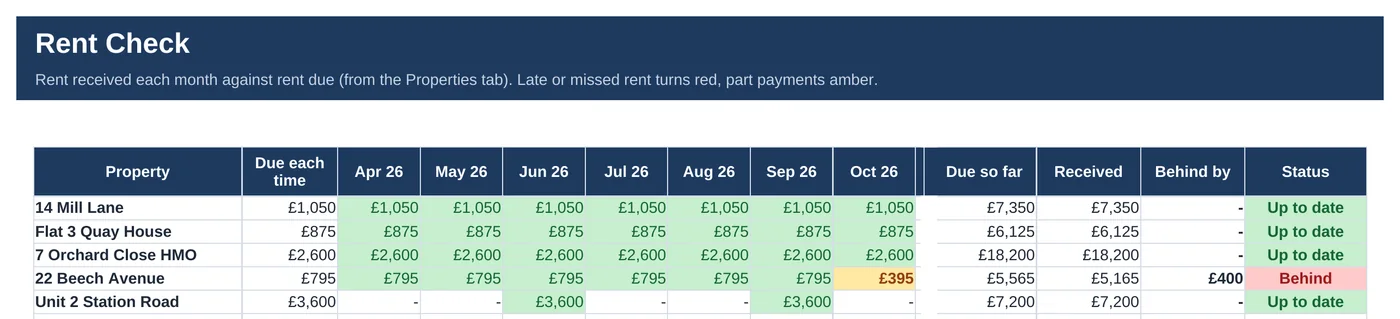
Rent Check compares the rent you received with the rent due, month by month, for every property. Part payments turn amber, missed rent turns red, and the Dashboard tells you who to chase.

You'll spot a £395 short payment in October, not in January when you finally do the books.

Rent Check tab: five example properties with rent received April to October 2026 in green, a part payment of £395 in amber for 22 Beech Avenue, and its status "Behind" by £400. Empty months November to March are hidden in this image£400 behind, flagged automatically
Get the tracker · £16.99 Instant download · Excel & Google Sheets
03

Enter your mortgage interest once, not twelve times

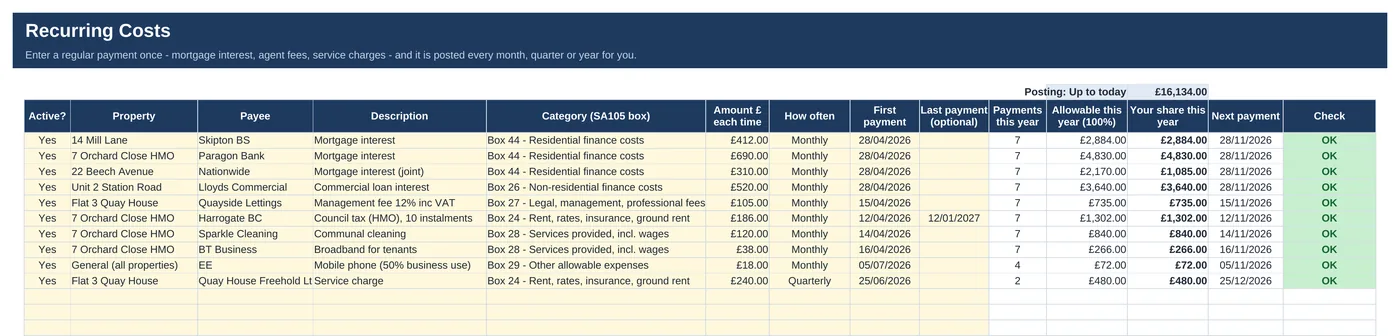
Mortgage interest, letting agent fees, insurance and service charges go in once. The tracker posts them every month, quarter, six months or year, in the right SA105 box.

About 10 minutes a month is enough to keep everything up to date.

Recurring Costs tab listing regular payments such as mortgage interest, agent fees, insurance and service charges, each with a frequency, SA105 box and amount posted so far this year
04

Never guess your next MTD deadline

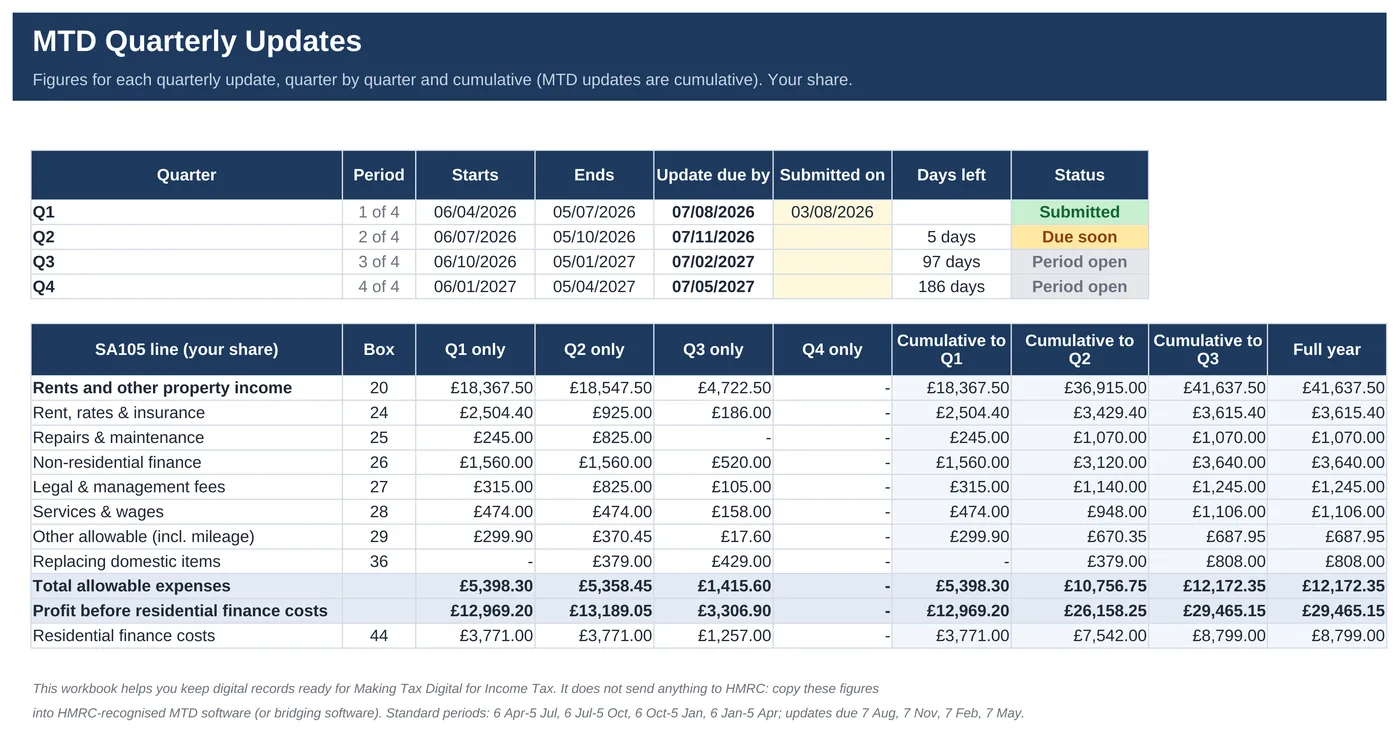
Each Making Tax Digital quarter is added up for you, on its own and cumulatively, with the date the update is due, the days left and a status: Submitted, Due soon or Period open.

The 2026/27 dates (7 Aug, 7 Nov, 7 Feb, 7 May) are built in, taken from gov.uk.

MTD Quarterly Updates tab: quarters Q1 to Q4 with start, end and due dates, Q1 submitted, Q2 due 7 Nov 2026 with 5 days left, and SA105 line totals per quarter and cumulativeQ2 due soon · 5 days left
Get the tracker · £16.99 One-off price · no subscription
05

Your SA105 boxes, ready to copy

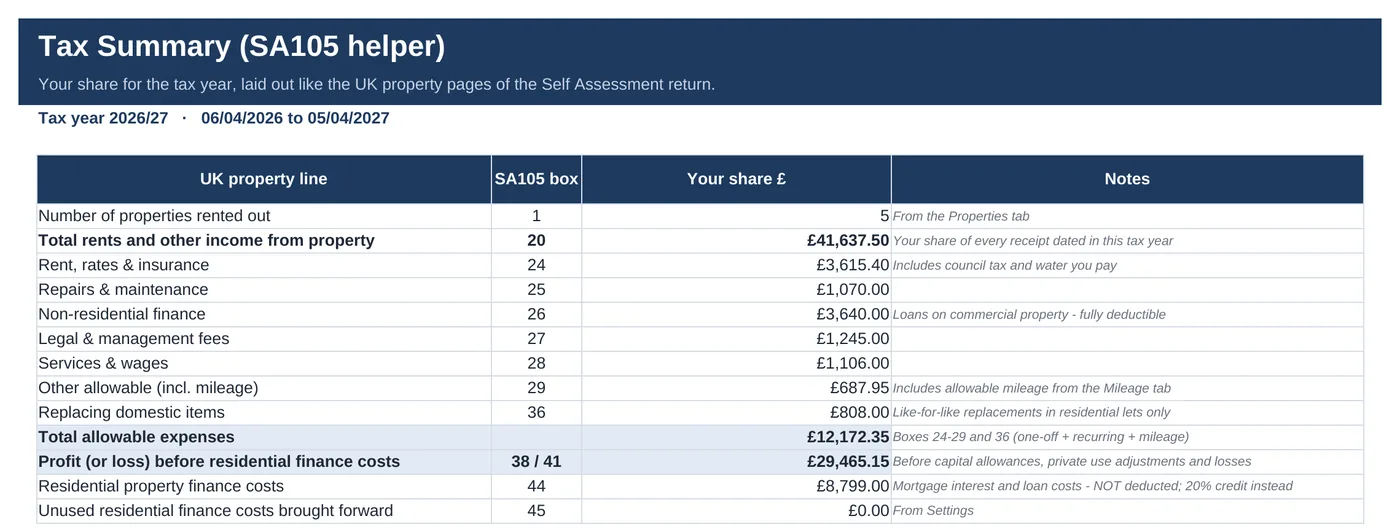
Every cost lands in its SA105 box as you enter it: 24, 25, 26, 27, 28, 29 and 36, with residential finance costs kept apart in box 44. At year end your Self Assessment figures are already laid out, box by box.

No more sorting a year of receipts into categories in April.

Tax Summary tab laid out like the SA105 UK property pages: total rents £41,637.50 in box 20, rent, rates and insurance in box 24, repairs in box 25 and so on, with your share and notes for each line
06

Section 24 and the £1,000 allowance, worked out

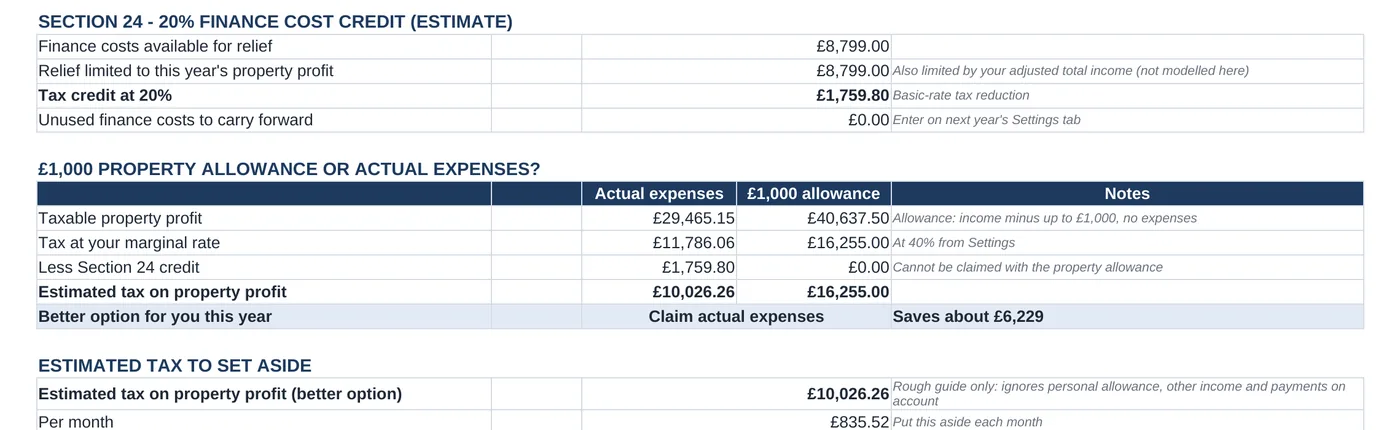
Residential mortgage interest is kept out of your expenses and your 20% tax credit is estimated. The tracker also compares your actual costs with the £1,000 property allowance and shows the better option.

Estimates only, to help you plan. Check them against HMRC guidance or with your accountant.

Section 24 finance cost credit estimate of £1,759.80, and a comparison of actual expenses against the £1,000 property allowance showing "Claim actual expenses" as the better option
07

Set up in one sitting, with a guide to follow

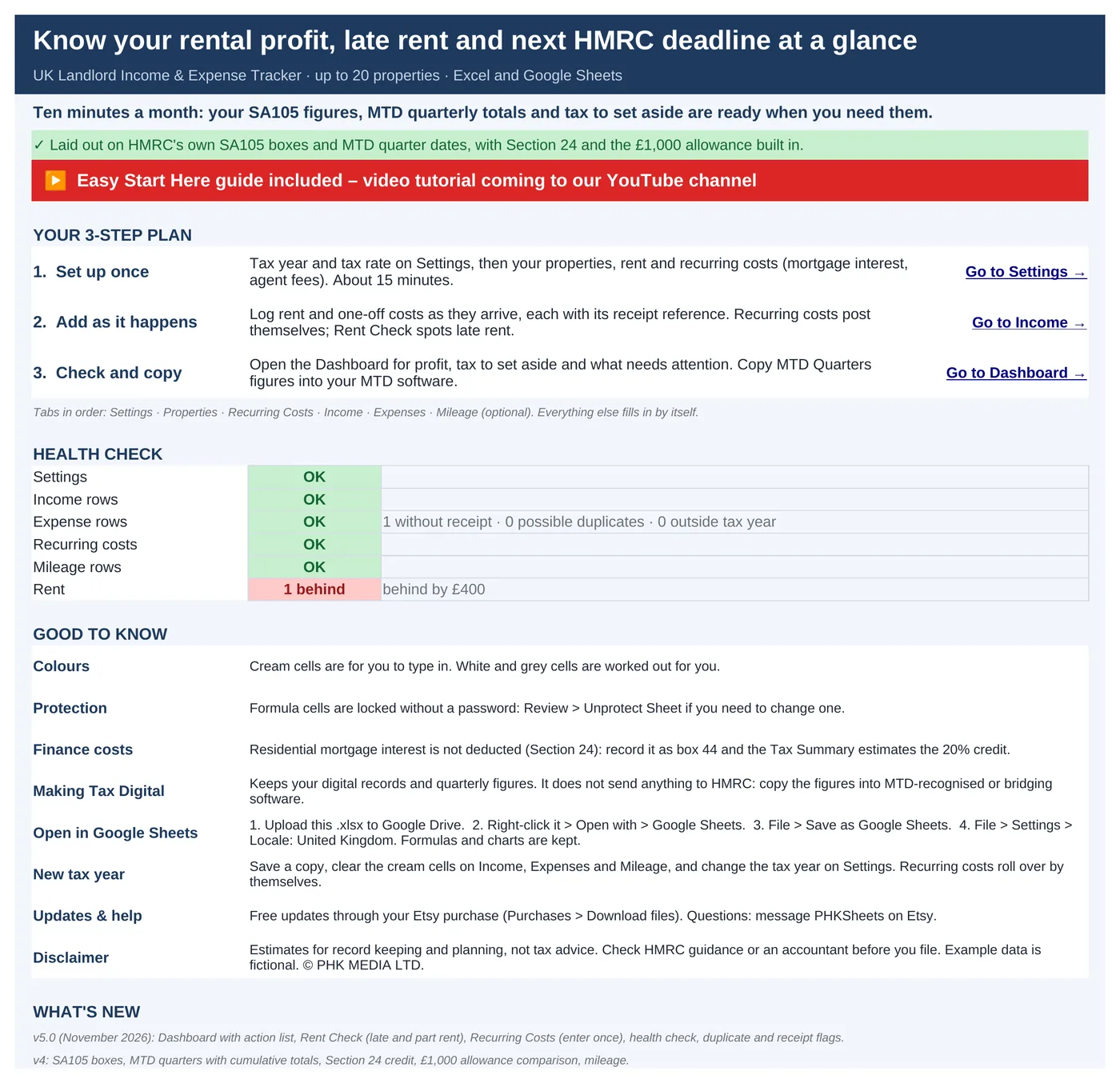
The first tab gives you a three-step plan and a health check. An example file with five fictional properties shows how everything works, and a one-page Start-here guide walks you through it.

Cream cells are for you, the rest is worked out. Sheets are protected (no password) so formulas don't get overwritten by accident.

Start Here tab with a three-step plan (set up, add as you go, check and copy), a colour key for input cells and a health check list
Get all 7 for £16.99 Instant download · stuck? Message us for help

Compare

Three ways to do your rental accounts

FeatureReceipts & bank statementsA blank spreadsheetThis tracker
Profit per property, live✗No~ If you build it✓ Dashboard + P&L
Late rent flagged✗No~ Manual✓ Amber / red
Costs sorted into SA105 boxes✗ In April~ Your own categories✓ As you type
MTD quarter totals & due dates✗No~ You add them up✓ Built in for 2026/27
Section 24 & £1,000 allowance✗No✗No✓ Estimated
Joint-owner share✗No~ Extra formulas✓ Enter it once
CostFree, plus your timeFree, plus your time£16.99 once

Need to send MTD updates? You still need HMRC-recognised software or bridging software. This tracker keeps your records and works out the figures to copy across. It never connects to HMRC.

What's inside

Everything you download, in one zip

The 15-second tour Dashboard → MTD quarters → Tax Summary, scrolled in the example file.

3 files

  • XLSX Example tracker5 fictional properties to explore
  • XLSX Blank trackerready for your own data
  • PDF Start-here guideone page, including Google Sheets set-up
Read the Start-here guide free (PDF) →

13 tabs

  1. Start here
  2. Dashboard
  3. Settings
  4. Properties
  5. Income
  6. Expenses
  7. Recurring costs
  8. Mileage
  9. Rent Check
  10. Monthly summary
  11. Property P&L
  12. MTD quarters
  13. Tax Summary
Four charts from the Dashboard: income vs expenses by month, expenses by SA105 box, profit by property after finance costs, and profit year to date
4 charts that redraw as you add rows

Checks on every row

  • Missing receipt reference
  • Possible duplicate
  • Missing property or category
  • Date outside the tax year

Also included

  • Mileage at HMRC rates (55p / 25p, editable)
  • MTD threshold check: £50k · £30k · £20k
  • Monthly summary & P&L per property

Is it right for you?

Made for some landlords, honestly not for others

A good fit if you…

  • let 1 to 20 properties in the UK, residential or commercial
  • file Self Assessment as an individual or a joint owner
  • are coming into MTD for Income Tax (from April 2026, 2027 or 2028)
  • want your numbers in a spreadsheet you own, not another subscription
  • use Excel or Google Sheets on a computer

Not for you if you…

  • let property through a limited company
  • let property outside the UK
  • need software that submits to HMRC by itself
  • use the accruals basis, capital allowances or losses brought forward
  • only use Apple Numbers or a phone

How it works

Three steps, about 15 minutes to set up

  1. 1

    Set up once

    Tax year, tax rate, your properties, rent and regular costs.

  2. 2

    Add as it happens

    Rent and one-off costs, each with a receipt reference.

  3. 3

    Check & copy

    Open the Dashboard, then copy your MTD quarter figures into your MTD software.

Microsoft Excel2010 or newer, Windows & Mac, Microsoft 365
Google SheetsFree Google account. Upload the .xlsx, then set the locale to United Kingdom
0
No macrosNothing to enable, no add-ons. Not designed for Apple Numbers or editing on a phone

The 2026 change

Making Tax Digital is here for landlords

Since 6 April 2026, landlords and sole traders with qualifying income over £50,000 must keep digital records and send HMRC a quarterly update. The threshold drops to £30,000 from April 2027 and £20,000 from April 2028.

A quarterly update is not a tax return and no tax is paid with it. HMRC says spreadsheets can be used alongside bridging software, which is where this tracker fits.

Sources: GOV.UK: Five things you need to know ahead of the MTD quarterly deadline · GOV.UK: Using MTD for Income Tax for the first time · GOV.UK: Penalties for MTD for Income Tax

2026/27 quarterly update deadlines

  1. 7 Aug 2026Q1 · 6 Apr – 5 Jul
  2. 7 Nov 2026Q2 · 6 Jul – 5 Oct
  3. 7 Feb 2027Q3 · 6 Oct – 5 Jan
  4. 7 May 2027Q4 · 6 Jan – 5 Apr

HMRC says no penalty points apply for late quarterly updates in the 2026/27 tax year.

The Landlord Dashboard you get with the tracker
  • Instant download
  • Example + blank file
  • Start-here guide

The offer

Ultimate UK Landlord Income & Expense Tracker

£16.99one-off · no subscription

  • Tracker for 1–20 properties: Dashboard, Rent Check, MTD quarters, Tax Summary
  • Recurring costs posted for you, mileage at HMRC rates
  • Example file (5 fictional properties) + blank file
  • Start-here guide, including Google Sheets set-up
  • Licence for one business or household
Buy now · £16.99

Price includes VAT where applicable — calculated at checkout. Secure checkout by Payhip.

Questions? Email info@phkmedia.co.uk Stuck after you buy? We'll help you set it up.

Digital download, nothing is posted. A record-keeping and planning aid, not tax advice. Terms & licence.

FAQ

Questions landlords ask

Does it send my figures to HMRC?

No. It works out the figures for your Self Assessment (SA105) and your Making Tax Digital quarterly updates. You copy them into your tax return or your MTD software (or bridging software). It never connects to HMRC and is not HMRC-recognised software.

Which apps does it work in?

Microsoft Excel 2010 or newer (Windows and Mac) and Microsoft 365, and Google Sheets with a free Google account. There are no macros, so there's nothing to enable. Apple Numbers isn't supported, and a computer is recommended for data entry.

Can I start mid-year?

Yes. Enter what you have so far. The Dashboard and MTD tabs update as you add rows.

I own a property with my partner. Does that work?

Yes. Record the full rent and costs and enter your share once per property. Every tax figure then uses your share.

Can I use it for a limited company or property outside the UK?

No. It's built for individual UK landlords and joint owners: the 6 April tax year, HMRC's SA105 boxes, Section 24 and MTD for Income Tax, on the cash basis.

Does it work next tax year?

Yes. Change the tax year on the Settings tab and start a fresh copy of the blank file.

Is the tax figure exact?

No. It's an estimate to help you set money aside. It doesn't model your personal allowance or other income. Check with HMRC guidance or an accountant before you file.

What happens after I pay?

You get an instant download link for the zip: the example file, the blank file and the Start-here guide. Nothing physical is posted.

Can I get help if I'm stuck?

Yes. Message us at info@phkmedia.co.uk and we'll help you set it up.

Your next MTD update is coming up. Get your numbers ready.

Get the tracker · £16.99