Instant download · Excel & Google Sheets · no macros All templates

For UK employers, HR & payroll

7 reasons to get every redundancy figure right first time

You have to make roles redundant. Who qualifies, how many weeks does each person get, which weekly cap applies, what is the notice and holiday pay, and how much is tax-free? Get one figure wrong and you either overpay or face a claim. This calculator works it all out for every employee, with the April 2026 caps built in.

  • Excel & Google Sheets, no macros
  • Example + blank file
  • Start-here guide
  • One-off price, no subscription
Redundancy Pay Calculator: annotated screen from the example file

Screens from the included example file. All names and figures are fictional.

200employees
£751GB weekly cap from 6 April 2026
£30,000tax-free split shown
0macros, add-ons or subscriptions

The list

Why a ready-made calculator beats paper and a blank spreadsheet

01

Statutory redundancy pay for each employee

2 full years' service needed, ½ week's pay per full year under 22, 1 week aged 22 to 40 and 1½ weeks aged 41 or older, counting back up to 20 years
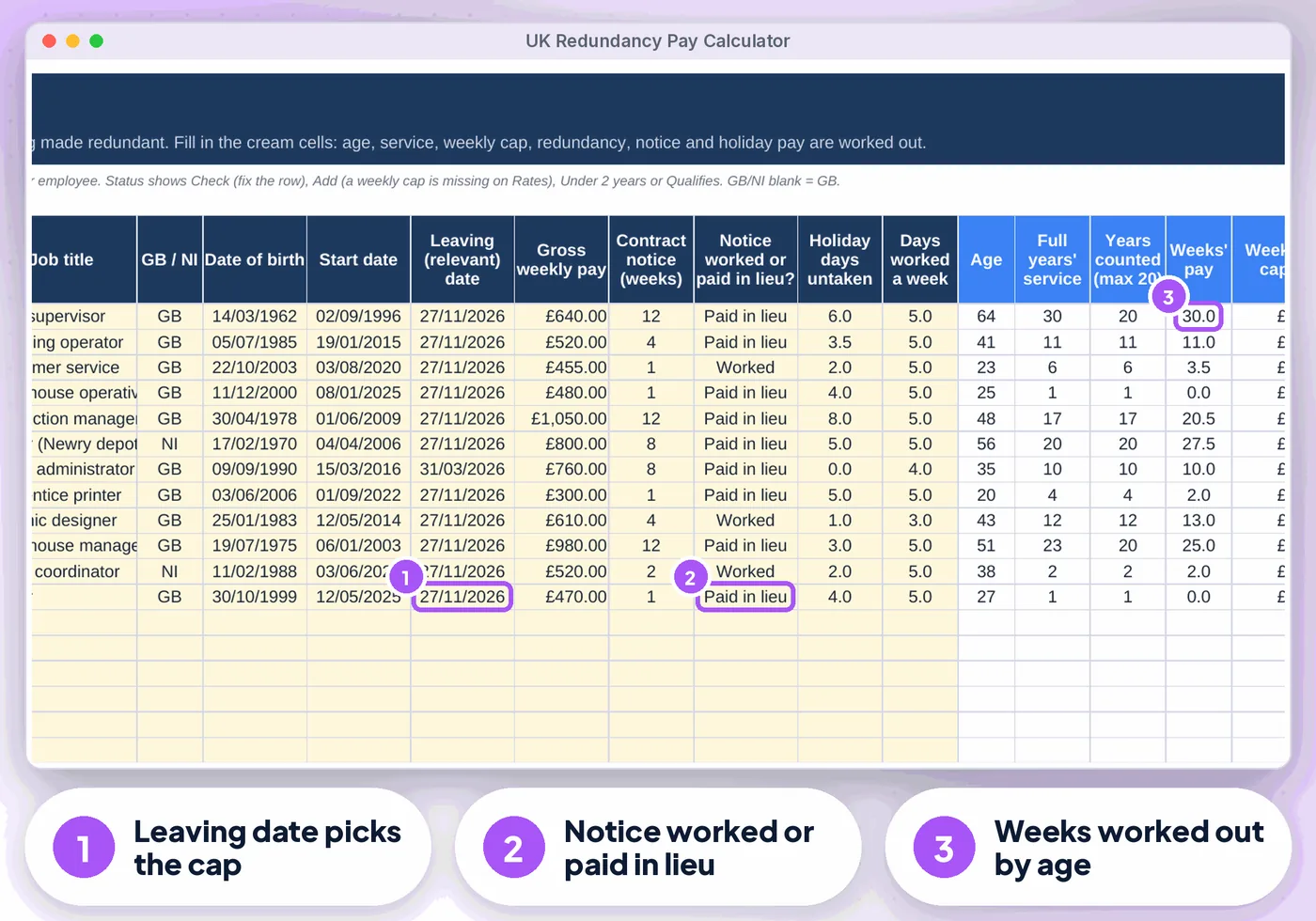
Redundancy Pay Calculator: annotated screen 1 from the example
02

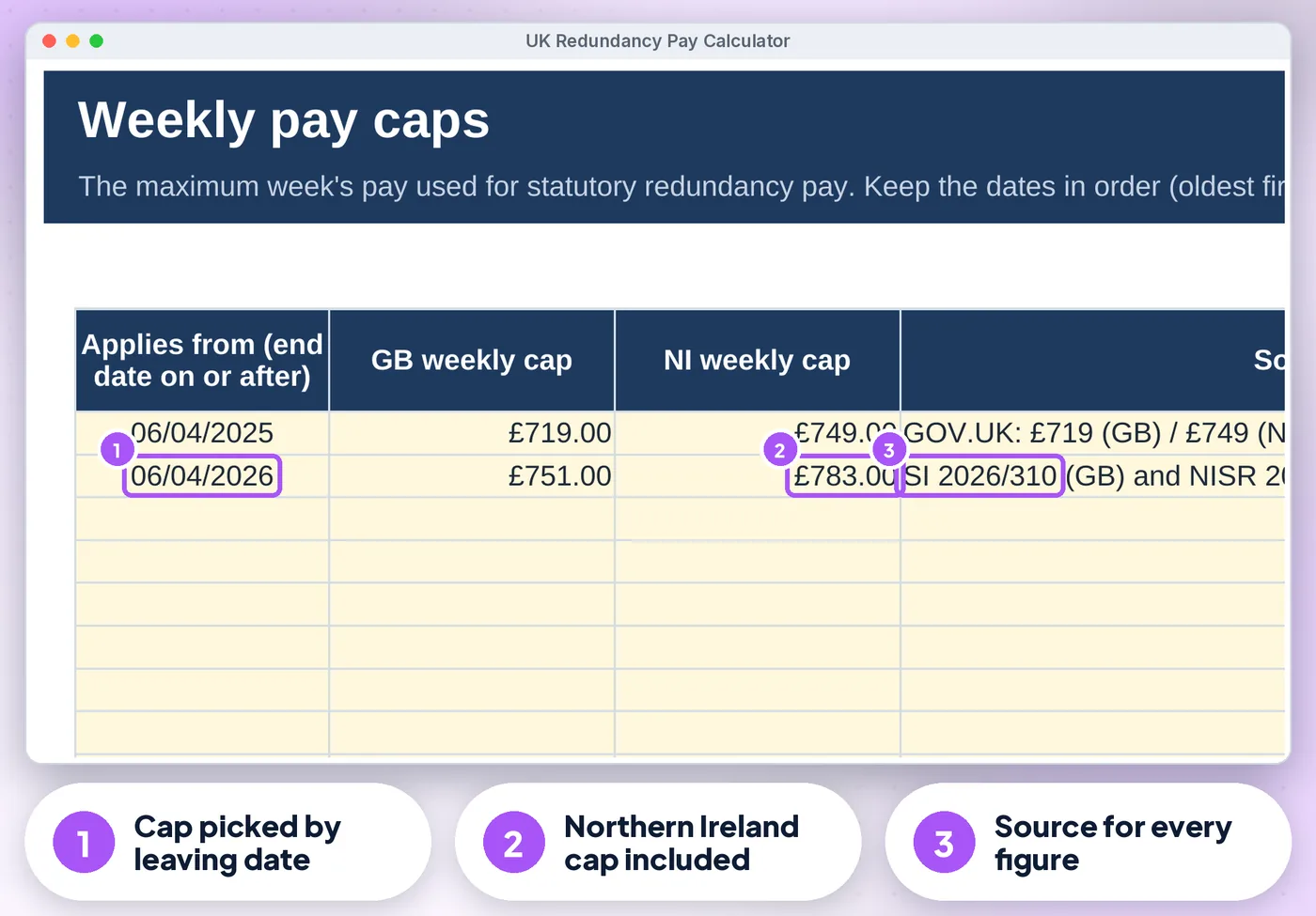
Weekly cap picked by the leaving

(relevant) date and country: £751 (GB) and £783 (Northern Ireland) from 6 April 2026, £719 / £749 before. Add next April's caps on the Rates tab
Redundancy Pay Calculator: annotated screen 2 from the example
Get the calculator · £12.99 Instant download · Excel & Google Sheets
03

Optional enhanced scheme

Multiply the statutory weeks (e.g. 1.5x or 2x) on capped or actual pay
Redundancy Pay Calculator: annotated screen 3 from the example
04

Notice

Statutory minimum or longer contract notice, worked or paid in lieu, plus pay for untaken holiday

05

Tax split

The first £30,000 of redundancy pay (statutory plus enhanced) shown as usually tax-free; notice and holiday pay shown as taxable through payroll

06

Clear Check messages for text in a date or pay cell, leaving dates

With no cap on the Rates tab, a Rates tab out of order and missing details

07

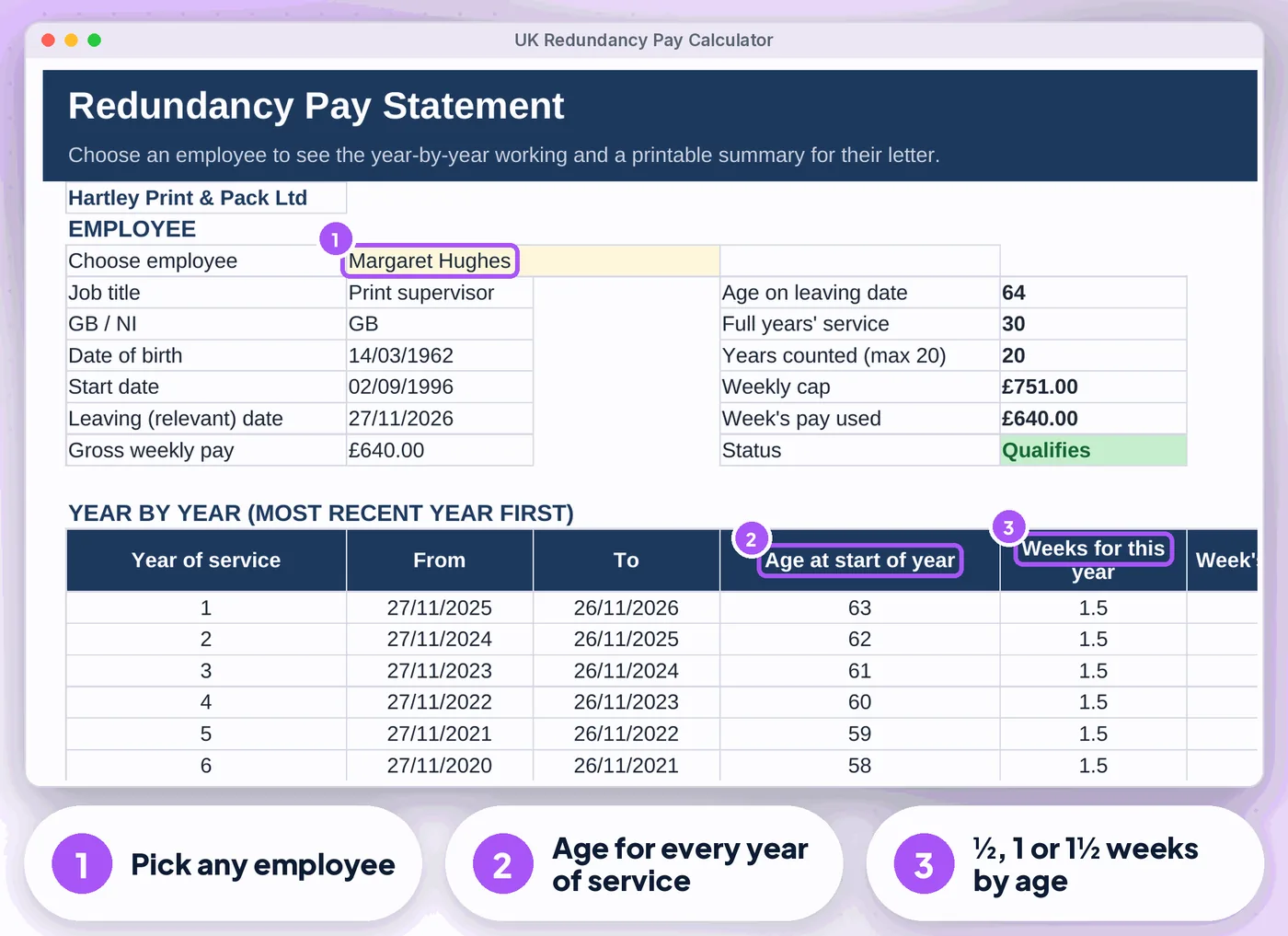
Redundancy Pay Statement

Pick an employee for the year-by-year working (age, weeks per year, week's pay) and a summary for their redundancy letter

Get the calculator · £12.99 Instant download · stuck? Email us for help

Compare

Three ways to keep these records

FeaturePaper or notesA blank spreadsheetThis calculator
Statutory redundancy pay for each employee✗No~ If you build it✓ Built in
Weekly cap picked by the leaving✗No~ If you build it✓ Built in
Optional enhanced scheme✗No~ If you build it✓ Built in
Notice✗No~ If you build it✓ Built in
Tax split✗No~ If you build it✓ Built in
CostFree, plus your timeFree, plus your time£12.99 once

What's inside

Everything you download

3 files

  • XLSX UK-Redundancy-Pay-Calculator.xlsxfilled with fictional example data (12 employees, GB and NI) so you can see how it works
  • XLSX UK-Redundancy-Pay-Calculator-BLANK.xlsxan empty copy, ready for your own team
  • PDF Start-here.pdfone-page quick-start guide, including how to open it in Google Sheets

Also included

  • Dashboard: totals, who gets what (largest first), a "What needs your attention" list (under 2 years, above the cap…
  • Up to 200 employees, GB and Northern Ireland in the same file

Good to know

  • A Health check on the Start Here tab and a Check/Status column on every log flag missing or odd entries
  • Week's pay is the average over the 12 weeks before notice is given; enter it yourself. Part-week, shift and variable pay averaging is not worked out for you
  • Statutory notice: at least 1 week after 1 month, then 1 week for each full year from 2 years, up to 12 weeks. The contract can give more
  • Dates show as DD/MM/YYYY
Redundancy Pay Calculator: another screen from the example
Redundancy Pay Calculator Screens from the included example file. All names and figures are fictional.

Is it right for you?

Made for some, honestly not for others

A good fit if you…

  • UK employers, HR teams, bookkeepers and payroll staff
  • use Excel or Google Sheets on a computer
  • want to pay once, not another subscription

Not for you if you…

  • need Apple Numbers or mobile-only editing
  • want someone to do the records for you

How it works

Three steps, about 2 minutes to set up

  1. 1

    Set up once

    Your business name, any enhanced scheme and the tax-free limit on Settings (about 2 minutes)

  2. 2

    Add each employee

    Date of birth, start and leaving date, average weekly pay, notice and untaken holiday

  3. 3

    Check and pay

    Read the Dashboard, fix anything flagged, then print the Statement for each employee

Microsoft Excel2010 or newer (Windows & Mac) and Microsoft 365
Google SheetsFree Google account. Upload the .xlsx, then set the locale to United Kingdom
0
No macrosNothing to enable, no add-ons or subscriptions. Not designed for Apple Numbers or mobile-only editing. A computer is recommended
Redundancy Pay Calculator preview
  • Instant download
  • Example + blank file
  • Start-here guide

The offer

Pro UK Redundancy Pay Calculator

£12.99one-off · no subscription

  • Filled with fictional example data (12 employees, GB and NI) (UK-Redundancy-Pay-Calculator.xlsx)
  • An empty copy, ready for your own team (UK-Redundancy-Pay-Calculator-BLANK.xlsx)
  • One-page quick-start guide, including how to open it in Google Sheets (Start-here.pdf)
  • Licensed for use within one business or household
Buy now · £12.99

Price includes VAT where applicable — calculated at checkout. Secure checkout by Payhip.

Questions? Email info@phkmedia.co.uk Stuck after you buy? We'll help you set it up.

Digital download, nothing is posted. This calculator is a calculation aid, not legal or tax advice. Terms & licence.

FAQ

Questions people ask

Does it handle employees in Northern Ireland?

Yes. Pick NI on the row and the NI cap is used.

Will it work next April?

Yes. Add the new caps as a row on the Rates tab; older leaving dates keep the old caps. Free updates are sent when the caps change.

What happens after I pay?

This is a digital product. Nothing physical will be shipped. Your download link appears straight after checkout and is also emailed to you.

Can I get help if I'm stuck?

Yes. Message us at info@phkmedia.co.uk and we'll help you set it up.

Stop doing it the hard way. Get the Redundancy Pay Calculator.

Get the calculator · £12.99