Instant download · Excel & Google Sheets · no macros All templates

For UK small businesses that produce waste

7 reasons to get your waste paperwork out of the drawer

A drawer of waste transfer notes, a skip firm whose licence nobody has checked since last year, and an oil collection with no consignee return. This register keeps your waste duty of care paperwork in one place: which carriers are checked and in date, which notes are missing, and where your waste goes.

  • Excel & Google Sheets, no macros
  • Example + blank file
  • Start-here guide
  • One-off price, no subscription
Waste Transfer Note Register: annotated screen from the example file

Screens from the included example file. All names and figures are fictional.

100carriers
3,000transfers
30waste types with EWC codes
0macros, add-ons or subscriptions

The list

Why a ready-made register beats paper and a blank spreadsheet

01

A status for every transfer

Keep, Missing note, Can be disposed of, or a Check message (wrong note type for hazardous waste, outside the season ticket, carrier expired on the day)
Waste Transfer Note Register: annotated screen 1 from the example
02

Keep-until date per note

2 years for transfer notes and season tickets, 3 years for hazardous consignment notes (change on Settings)
Waste Transfer Note Register: annotated screen 2 from the example
Get the register · £10.99 Instant download · Excel & Google Sheets
03

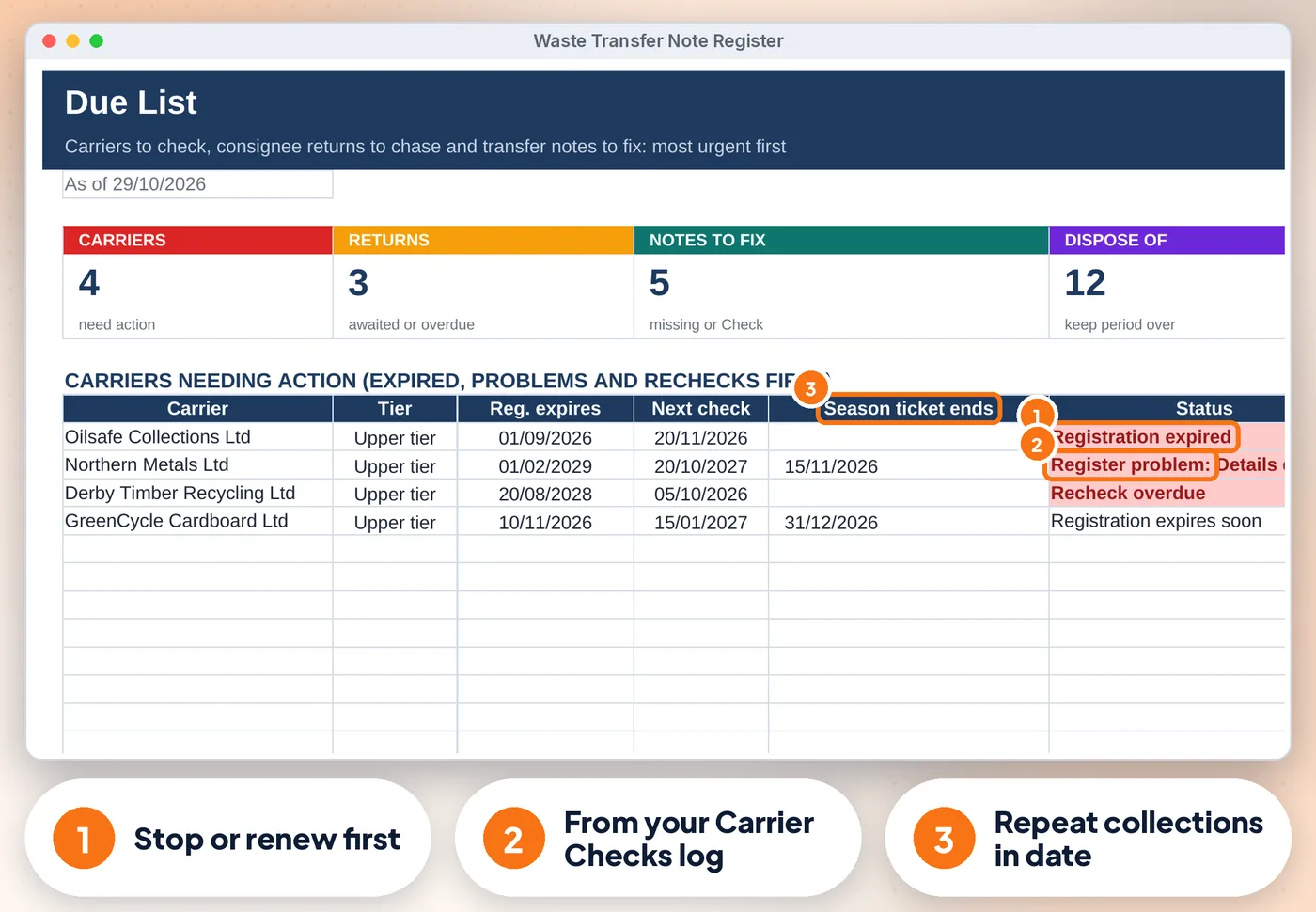
Carriers

Registration number, tier, expiry, season ticket end and the next register check, with expired and due-soon alerts
Waste Transfer Note Register: annotated screen 3 from the example
04

Carrier Checks

A dated evidence log of every public register check and its result. A problem shows on the Dashboard

05

Consignee returns for hazardous waste

The due date (one month after the quarter) and overdue returns flagged

06

Weight, cost, route (recycled

Recovered, landfill) and the waste hierarchy statement for each note

07

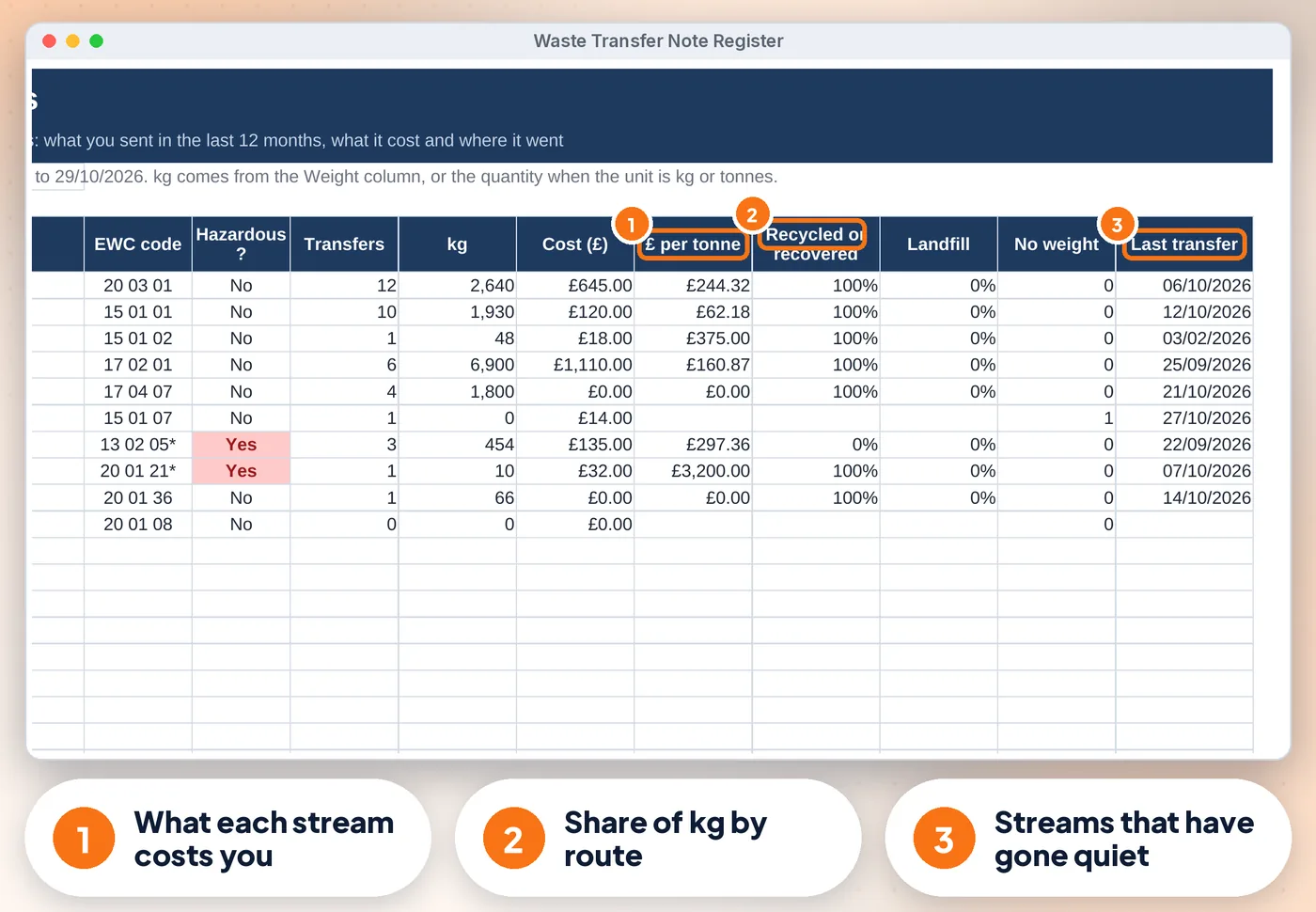
Waste Streams

Kg, cost, £ per tonne and % recycled or recovered per waste type over 12 months

Get the register · £10.99 Instant download · stuck? Email us for help

Compare

Three ways to keep these records

FeaturePaper or notesA blank spreadsheetThis register
A status for every transfer✗No~ If you build it✓ Built in
Keep-until date per note✗No~ If you build it✓ Built in
Carriers✗No~ If you build it✓ Built in
Carrier Checks✗No~ If you build it✓ Built in
Consignee returns for hazardous waste✗No~ If you build it✓ Built in
CostFree, plus your timeFree, plus your time£10.99 once

What's inside

Everything you download

3 files

  • XLSX Waste-Transfer-Note-Register.xlsxfilled with fictional example data (a joinery workshop, 8 carriers, 63 transfers) so you can see how it works
  • XLSX Waste-Transfer-Note-Register-BLANK.xlsxan empty copy, ready for your own records
  • PDF Start-here.pdfone-page quick-start guide, including how to open it in Google Sheets

Also included

  • Due List: carriers needing action, consignee returns to chase and notes to fix, most urgent first
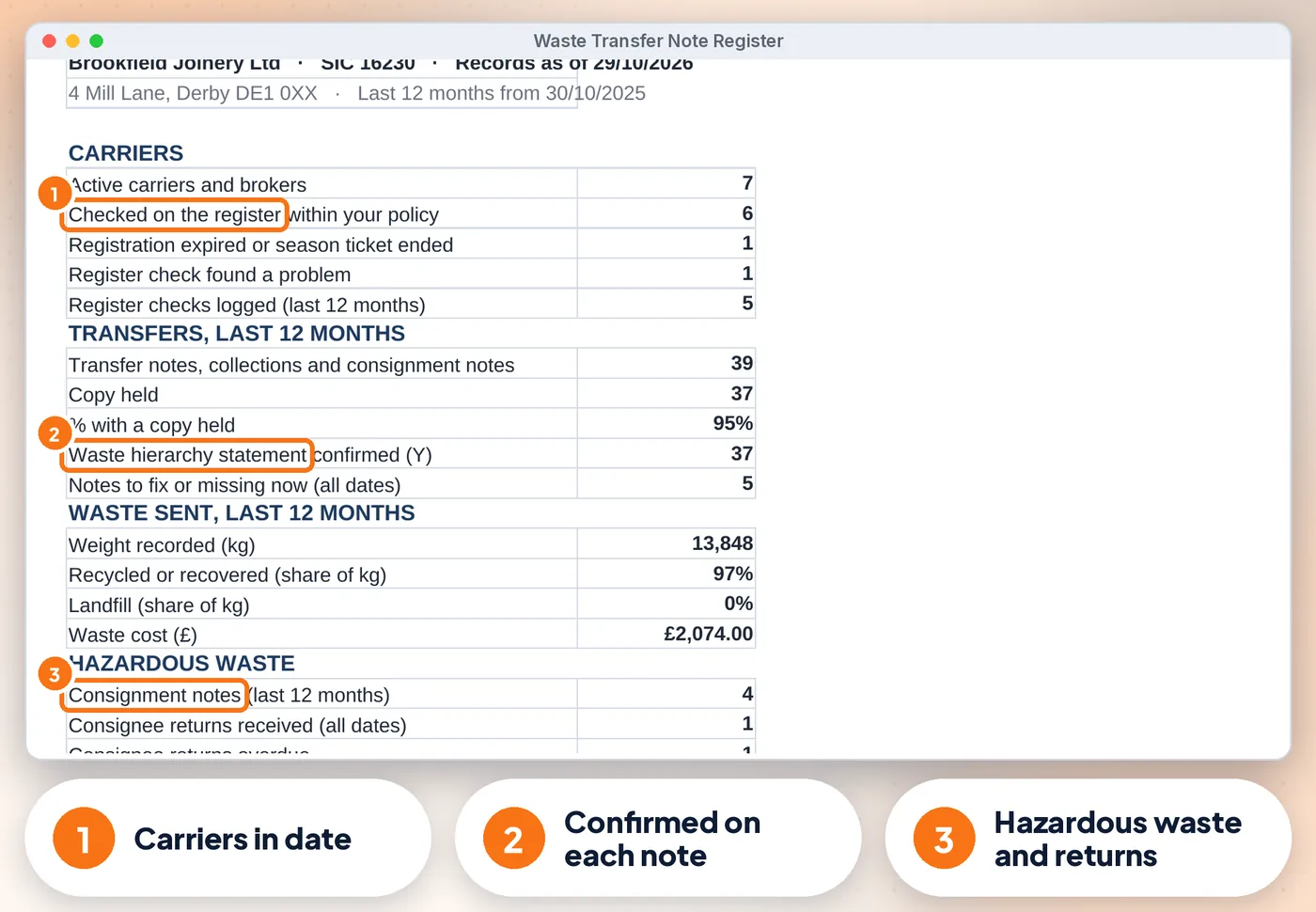
  • Audit Pack: one printable page with carriers in date, notes held, waste sent, hazardous returns and a sign-off box
  • Dashboard with a "What needs your attention" list and 4 charts
  • Up to 100 carriers, 3,000 transfers, 500 register checks and 30 waste types with EWC codes

Good to know

  • A Health check on the Start Here tab and a Check/Status column on every log flag missing or odd entries
  • Consignee returns: the receiving site must send them within one month of the end of the quarter it accepted the waste (Hazardous Waste Regulations 2005)
  • Digital waste tracking started for permitted receiving sites in England on 1 October 2026; transfer and consignment notes are still needed alongside it for now
  • Dates show as DD/MM/YYYY
Waste Transfer Note Register: another screen from the example
Waste Transfer Note Register Screens from the included example file. All names and figures are fictional.

Is it right for you?

Made for some, honestly not for others

A good fit if you…

  • UK small businesses, workshops, trades, shops, offices, cafés and garages that produce waste
  • use Excel or Google Sheets on a computer
  • want to pay once, not another subscription

Not for you if you…

  • need Apple Numbers or mobile-only editing
  • want someone to do the records for you

How it works

Three steps, about 15 minutes to set up

  1. 1

    Set up once

    Your business, SIC code, waste types and carriers (about 15 minutes)

  2. 2

    Record as you go

    One row per collection and one per register check

  3. 3

    Check and act

    Open the Dashboard and the Due List, print the Audit Pack when asked

Microsoft Excel2010 or newer (Windows & Mac) and Microsoft 365
Google SheetsFree Google account. Upload the .xlsx, then set the locale to United Kingdom
0
No macrosNothing to enable, no add-ons or subscriptions. Not designed for Apple Numbers or mobile-only editing. A computer is recommended
Waste Transfer Note Register preview
  • Instant download
  • Example + blank file
  • Start-here guide

The offer

Complete Waste Transfer Note Register

£10.99one-off · no subscription

  • Filled with fictional example data (a joinery workshop, 8 carriers, 63 transfers) (Waste-Transfer-Note-Register.xlsx)
  • An empty copy, ready for your own records (Waste-Transfer-Note-Register-BLANK.xlsx)
  • One-page quick-start guide, including how to open it in Google Sheets (Start-here.pdf)
  • Licensed for use within one business or household
Buy now · £10.99

Price includes VAT where applicable — calculated at checkout. Secure checkout by Payhip.

Questions? Email info@phkmedia.co.uk Stuck after you buy? We'll help you set it up.

Digital download, nothing is posted. This register is a record-keeping aid, not legal or environmental advice. Terms & licence.

FAQ

Questions people ask

Does it create the transfer notes?

No. Your carrier gives you the note; this register records it and checks you have it.

Does it check the public register for me?

No. It reminds you when a check is due and keeps your evidence.

Does it work on a phone?

You can view it in the Google Sheets app, but entering data is easiest on a computer.

What happens after I pay?

This is a digital product. Nothing physical will be shipped. Your download link appears straight after checkout and is also emailed to you.

Can I get help if I'm stuck?

Yes. Message us at info@phkmedia.co.uk and we'll help you set it up.

Stop doing it the hard way. Get the Waste Transfer Note Register.

Get the register · £10.99