Instant download · works offline · no account, no subscription All templates

For small UK shops, cafés, pubs & takeaways

7 reasons to cash up in minutes, not on a napkin

Count the notes and coins, type the till Z reading and the card total, and see straight away whether you are balanced, over or short, what to leave as tomorrow's float and what to bank. Cash Up is an offline end-of-day cash-up app for small UK shops, cafés, pubs, takeaways and market stalls, now with a dashboard.

  • Works offline, one HTML file
  • Desktop browser & Android
  • Demo data to try first
  • No account, no subscription
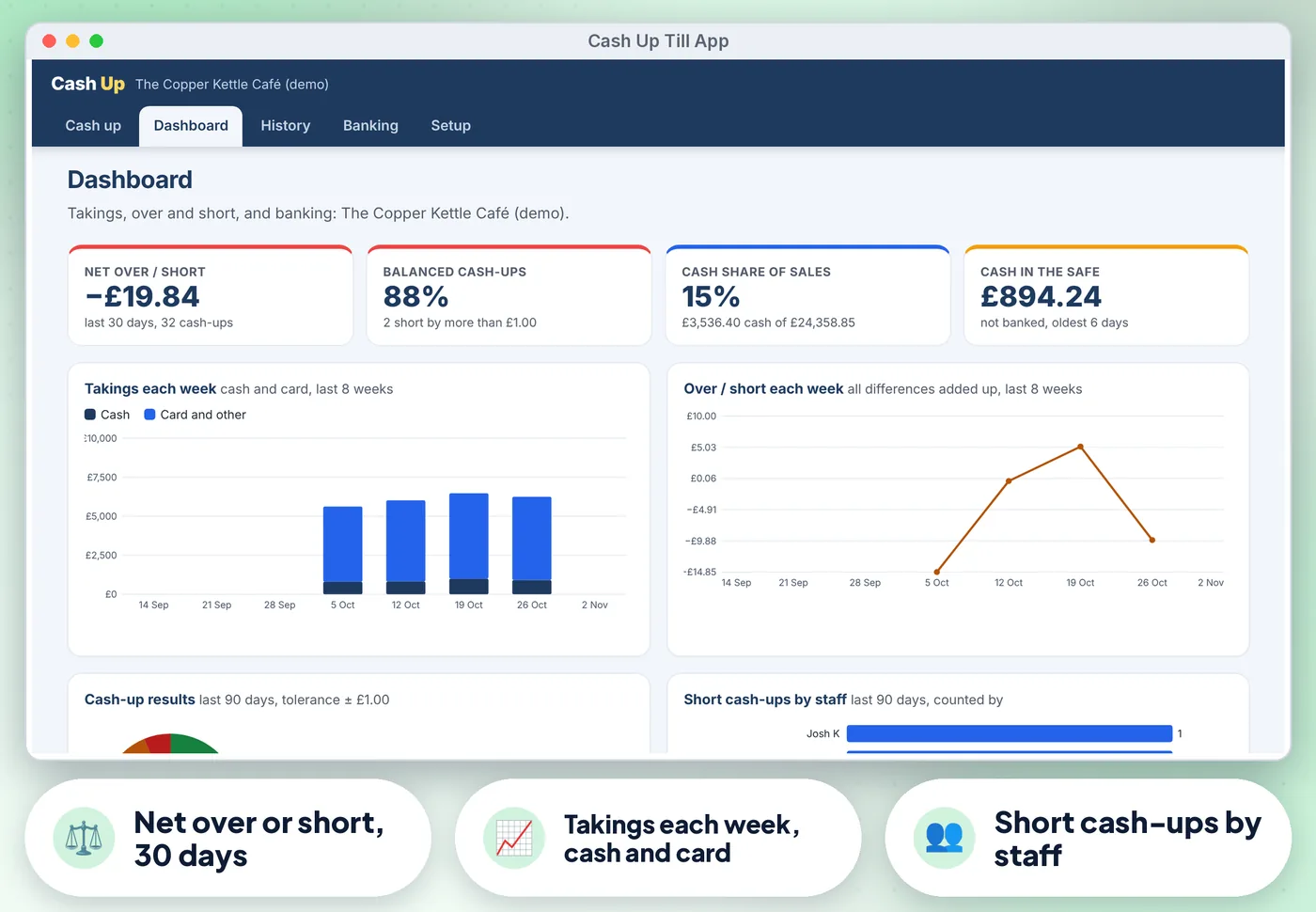
Cash Up App: annotated screen from the demo data

Screens from the app's built-in demo data. All names and figures are fictional.

£50 to 1pevery denomination
1HTML file, works offline
0accounts, installs or subscriptions

The list

Why a ready-made app beats paper and a blank spreadsheet

01

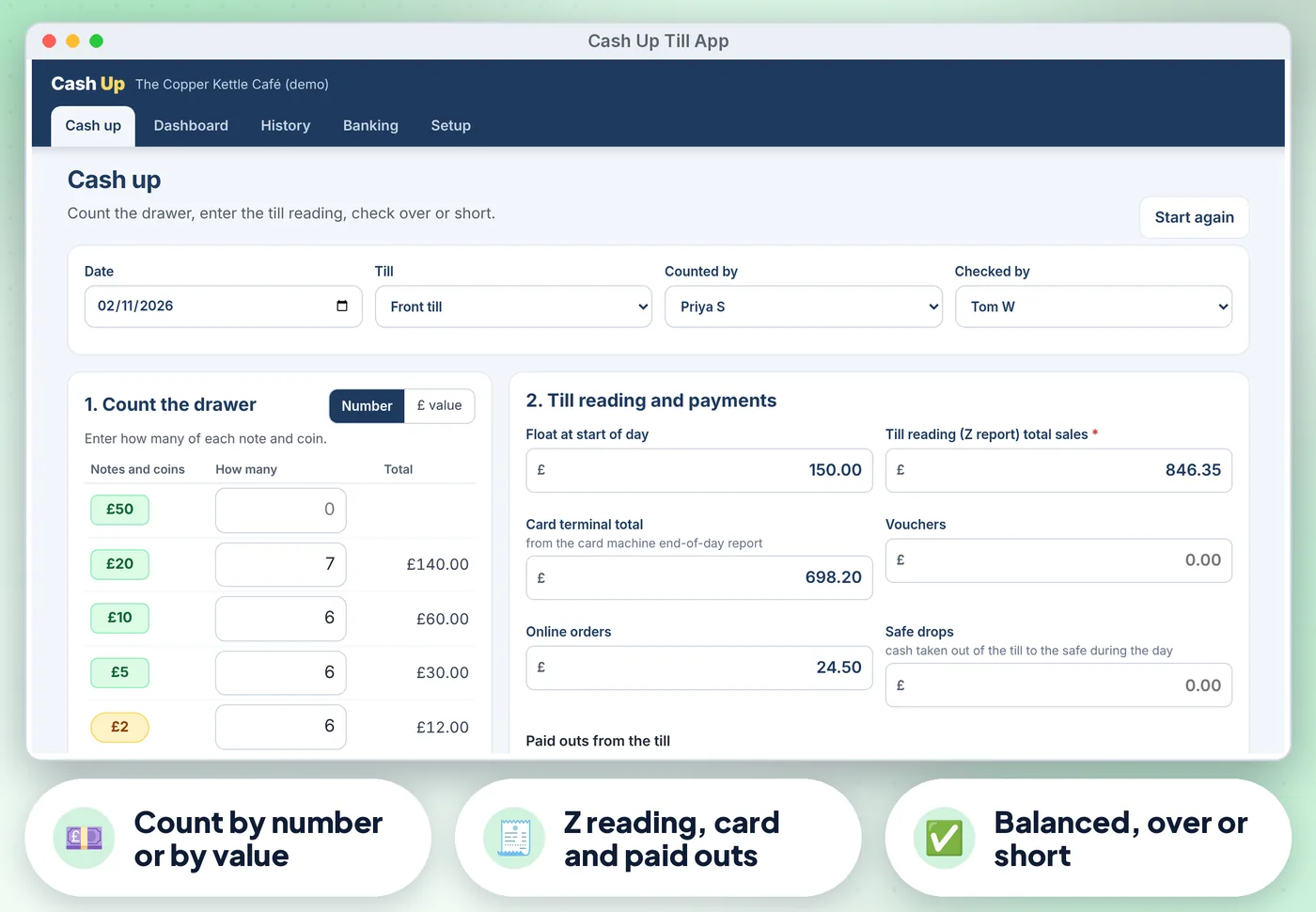
Denomination count from £50 notes to 1p coins, by number or by £ value

With impossible values (such as £2.50 in £1 coins) marked in red
Cash Up App: annotated screen 1 from the demo data
02

Till Z reading, card terminal total, your own extra payment types

(vouchers, delivery apps, accounts), paid outs and safe drops
Cash Up App: annotated screen 2 from the demo data
Get the app · £10.99 Instant download · works offline
03

Instant result

Balanced, Over or Short against a tolerance you set (for example plus or minus £1.00)
Cash Up App: annotated screen 3 from the demo data
04

Float builder

Which notes and coins to leave in the drawer for tomorrow, and the rest to bank by note and coin with UK coin bag hints

05

Checks before saving

A missing Z reading, an empty count, a difference with no note and a second cash-up for the same till and day

06

Printable A4 cash-up sheet with Counted by and Checked by lines

07

Several tills and the staff who cash up

History with total sales, cash takings, net over or short and short days for any period, filtered by till or staff

Get the app · £10.99 Instant download · stuck? Email us for help

Compare

Three ways to keep these records

FeaturePaper formsA spreadsheetThis app
Instant result✗No~ If you build it✓ Built in
Float builder✗No~ If you build it✓ Built in
Checks before saving✗No~ If you build it✓ Built in
Printable A4 cash-up sheet with Counted by and Checked by lines✗No~ If you build it✓ Built in
Several tills and the staff who cash up✗No~ If you build it✓ Built in
CostFree, plus your timeFree, plus your time£10.99 once

What's inside

Everything you download

2 files

  • HTML Cash-Up.htmlthe app. One file, opens in your web browser, works offline
  • PDF Start-here.pdfquick-start guide with the 3-step plan and backup tips
  • + Demo data built in, so you can try everything first

Also included

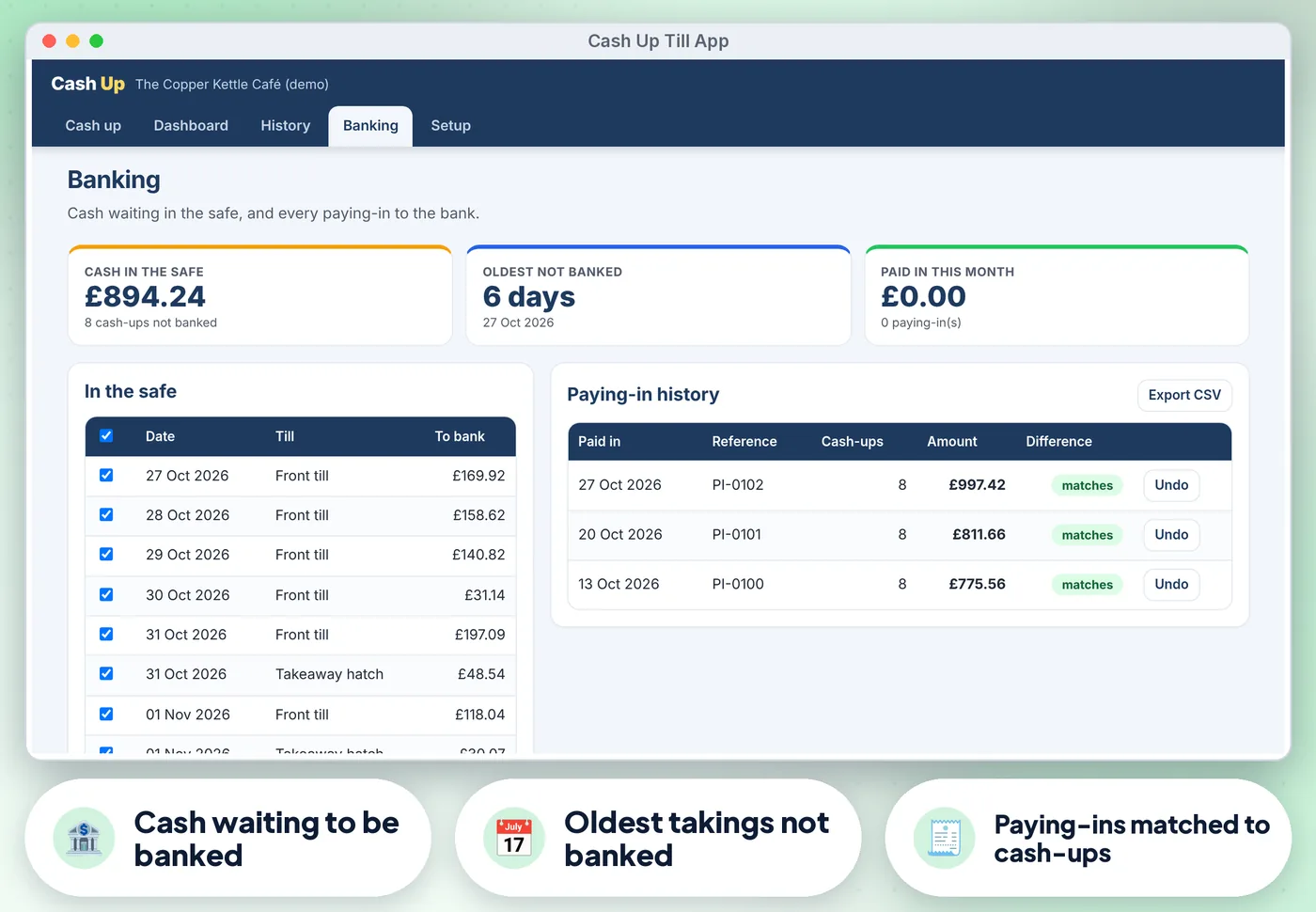
  • Banking: cash waiting in the safe, the oldest takings not banked, and paying-ins matched to cash-ups
  • Dashboard with net over or short for the last 30 days, the share of balanced cash-ups, cash share of sales and cash in…
  • Full keyboard use, screen-reader labels, a skip link and high-contrast colours (tested against WCAG 2.2 AA with axe)
  • CSV export of cash-ups and paying-ins for Excel, Google Sheets or your bookkeeper; print; JSON backup and restore
  • Demo data (a café with weeks of cash-ups) to try it first

Good to know

  • Records are saved in the browser on the device you use. Keep the cash-ups on one computer or tablet and download a backup (JSON) every week
  • Amounts are in pounds sterling with UK notes and coins. Coin bag hints follow the standard UK bag values; check your own bank's rules
  • Licence: use it for your own business (one business)
Cash Up App: another screen from the demo data
Cash Up App Screens from the app's built-in demo data. All names and figures are fictional.

Is it right for you?

Made for some, honestly not for others

A good fit if you…

  • owners and managers of small UK shops, cafés, pubs, takeaways and market stalls who cash up one or a few tills every day
  • want something that works offline, on a desktop browser or Android
  • want to pay once, not another subscription

Not for you if you…

  • you need the expected total pulled automatically from your EPOS
  • blind counts
  • several sites sharing one live record
  • an app on iPhone or iPad

How it works

Three steps, about 5 minutes to set up

  1. 1

    Open the app, try the demo

    Press Use my data. In Setup, enter your business name, the float you keep, your tolerance, your tills and staff (about 5 minutes).

  2. 2

    At closing, open Cash up

    Count the drawer, enter the Z reading and card total, add any paid outs, check the result and press Save.

  3. 3

    Bank the cash from Banking when you pay in

    And check the Dashboard each week for short days and patterns.

Desktop browserTested in Google Chrome on a desktop (1440 px wide) and on Android phone sizes (390 px and 360 px wide). Also runs in current Edge and Firefox, and Safari on Mac
Android phone or tabletWorks offline once the file is saved on the device
0
No account, no subscriptionno installation, no account, no subscription, nothing is sent over the internet. Not iPhone or iPad yet: Safari on iOS cannot keep the app data from a downloaded file reliably, so we do not support it
Cash Up App preview
  • Instant download
  • Demo data built in
  • Start-here guide

The offer

Cash Up

£10.99one-off · no subscription

  • The app. One file, opens in your web browser, works offline (Cash-Up.html)
  • Quick-start guide with the 3-step plan and backup tips (Start-here.pdf)
  • Licensed for use within one business or household
Buy now · £10.99

Price includes VAT where applicable — calculated at checkout. Secure checkout by Payhip.

Questions? Email info@phkmedia.co.uk Stuck after you buy? We'll help you set it up.

Digital download, nothing is posted. Cash Up is a record-keeping aid for counting and reconciling cash. Terms & licence.

FAQ

Questions people ask

Does it connect to my till?

No. Type the Z reading and card total from your till and card terminal. That keeps it simple and works with any till.

Can I cash up more than one till?

Yes. Add your tills in Setup and choose the till on each cash-up. History and the dashboard can be filtered by till.

What if we are short?

Add a note saying why. The dashboard shows short cash-ups by staff so you can spot a pattern fairly rather than guess.

What happens after I pay?

This is a digital product. Nothing physical will be shipped. Your download link appears straight after checkout and is also emailed to you.

Can I get help if I'm stuck?

Yes. Message us at info@phkmedia.co.uk and we'll help you set it up.
Stop doing it the hard way. Get the Cash Up App.

Get the app · £10.99